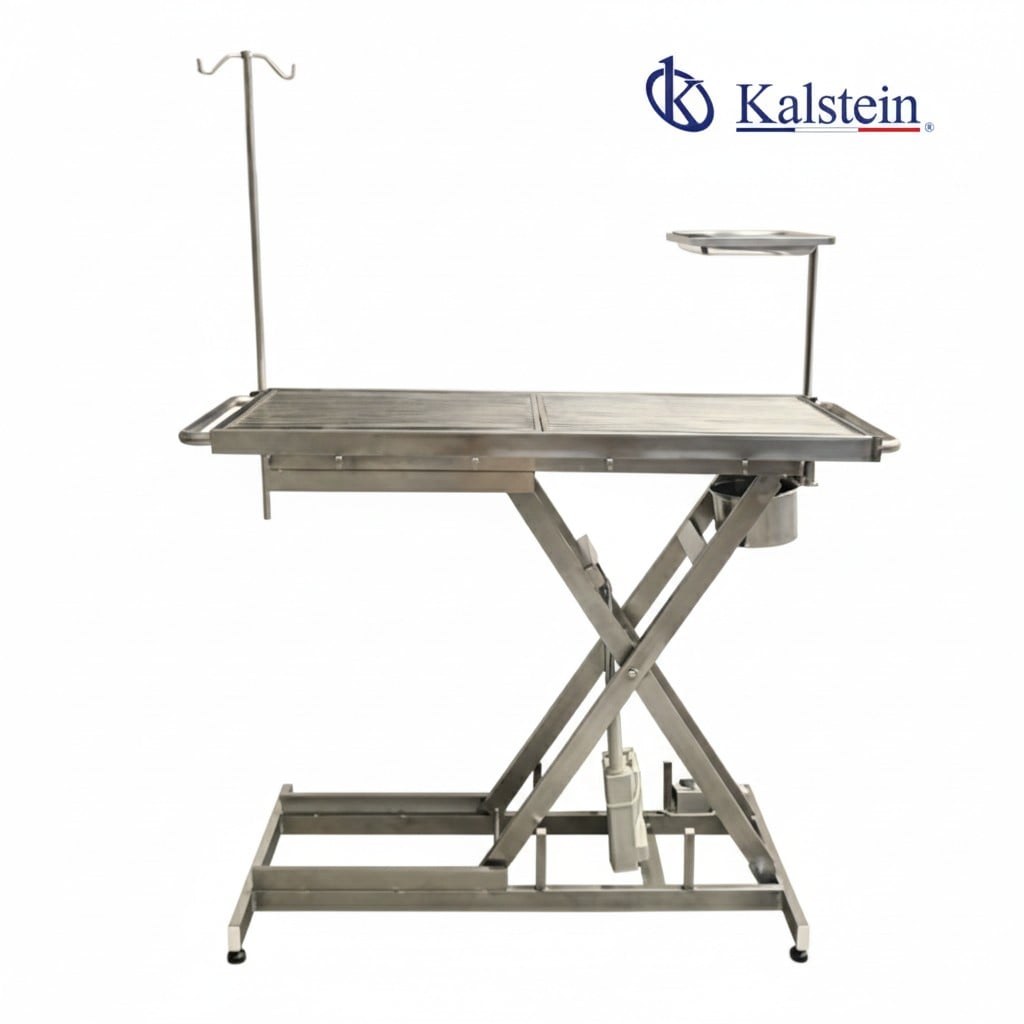
Troubleshooting the YR06599 Electric Lift Operating Table: Common Symptoms and Solutions
The YR06599 Electric Lift Operating Table is a high-end tool designed specifically for veterinary surgery. Notably recognized for its V-shaped surface and robust scissor-type electric lift system, this table guarantees maximum stability, hygiene, and operator ergonomics. However, like any high-performance equipment, it may experience issues over time. This guide aims to provide an in-depth analysis of common symptoms that may arise during the use of the YR06599 and their respective troubleshooting steps.
Technical Specification of the YR06599
| Feature | Detail |
| Model | YR06599 (Reference to X-V type electric lift table) |
| Material | Stainless Steel SUS#304 |
| Dimensions (Length x Width x Height) | 120(L) x 60(W) x 65(H) cm |
| Height Range | 36 cm to 108 cm |
| Lift Mechanism | Electric, operated by foot pedal |
| Surface Design | V-shaped |
| Standard Configuration | Infusion stand, instrument tray, universal wheel, fixed wheel |
Common Symptoms and Their Troubleshooting
Equipment Does Not Power On
If the YR06599 operating table does not power on, first check the power supply. Ensure that the unit is plugged into a functioning outlet and that the outlet is receiving power. If the electrical connection is secure, the next step is to inspect the foot pedal connection and its functionality.
Error Code Displayed
Common error codes can indicate issues with the lift mechanism or electrical system. Refer to the user manual for a list of error codes and their meanings. Resetting the system by unplugging the table for a few minutes may often resolve minor glitches.
Inconsistent Lift Performance
Inconsistent height adjustments can be caused by mechanical obstructions or issues with the lift mechanism. Conduct a visual inspection to ensure there are no foreign objects blocking the scissor lift mechanism. If problems persist, it may require maintenance or professional servicing.
Noise During Operation
Unusual noises can indicate mechanical wear or the need for lubrication. Check the lift mechanism for any signs of rust or debris. Regular maintenance checks should include lubrication of moving parts to prevent excessive wear.
Wheels Not Rolling Smoothly
If the table's mobility is hindered, inspect the wheels for debris or damage. Make sure that the wheels are properly locked and that no foreign objects obstruct their movement.
Height Adjustment Limit Not Reached
If the table does not reach its maximum height, it may be due to a faulty lift mechanism or sensor issue. Resetting the control system might help, but if the problem persists, consider contacting a technician for repair.
Symptom to Solution Matrix
| Symptom | Possible Causes | Solutions |
|---|---|---|
| Equipment Does Not Power On | Power supply issue, foot pedal malfunction | Check outlet, inspect connections |
| Error Code Displayed | System glitch, electrical fault | Reset the system, refer to manual |
| Inconsistent Lift Performance | Mechanical obstruction, worn parts | Inspect lift mechanism, perform maintenance |
| Noise During Operation | Lack of lubrication, mechanical wear | Lubricate moving parts, inspect for damage |
| Wheels Not Rolling Smoothly | Debris, wheel damage | Clean wheels, check for blockages |
| Height Adjustment Limit Not Reached | Faulty mechanism, sensor issue | Reset control system, seek professional help |
Frequently Asked Questions
What should I do if the YR06599 does not power on?
First, check the power connection to ensure that it is securely plugged into a functional outlet. If the power source is confirmed, examine the foot pedal connection for any issues.
How can I reset an error code on the YR06599?
To reset an error code, first unplug the table for about five minutes. Then, plug it back in and see if the error code clears. Consult the user manual for specific error codes and troubleshooting steps.
What maintenance is recommended for the YR06599 operating table?
Regular maintenance should include cleaning the surface and lift mechanism, lubricating moving parts, and checking electrical connections. Always follow the manufacturer's guidelines for maintenance.
Is it safe to use the YR06599 with a damaged wheel?
No, using the table with a damaged wheel can compromise safety and stability. Inspect the wheels frequently and replace any that show signs of damage or excessive wear.
What is the height adjustment range of the YR06599?
The YR06599 offers a height adjustment range from 36 cm to 108 cm, allowing for flexibility in various surgical settings.
Can I use the YR06599 in an environment with high humidity?
While the YR06599 is built with durable materials, it's essential to ensure that the operating environment is within the recommended conditions to prevent equipment malfunction.
How do I request a quote for the YR06599 Electric Lift Operating Table?
You can request a quote through the official inquiry channels, where our team will assist you in providing the necessary information for your purchase.
If you are looking for a fusion of innovation and quality, you have come to the right place. At Kalstein, we offer you the luxury of exploring our exclusive catalog of laboratory equipment. We manufacture every device to the highest standards of excellence. Our intuitive and seamless online purchasing channels are designed for your convenience, securing the most competitive prices. Hesitate no longer — we bring science to life, it is time to become part of our community.