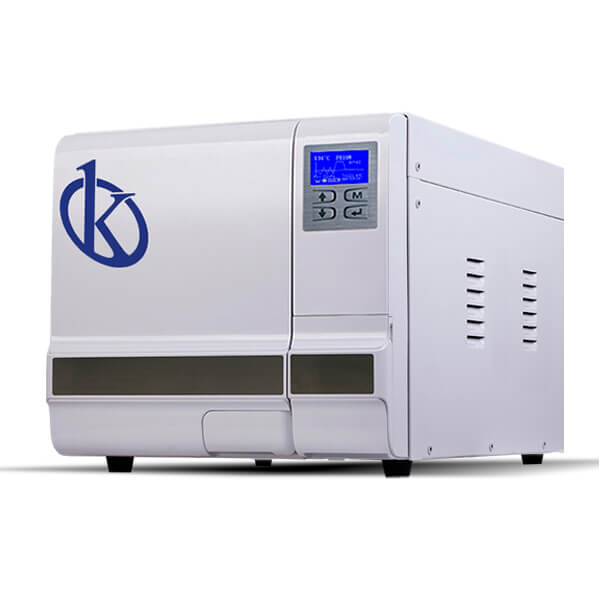
Troubleshooting the YR03390 Autoclave: Common Symptoms and Solutions
The YR03390 autoclave is a fully automatic Class B table autoclave that plays a critical role in various sectors, including clinical, veterinary, and beauty industries. However, like any piece of advanced equipment, users may encounter issues during operation. Understanding the common symptoms and their solutions can significantly enhance the user experience and ensure the longevity of the device.
Understanding the YR03390 Autoclave
The YR03390 is designed with high precision control mechanisms for sterilization processes. With a pre-vacuum system and triple fractionation method, it ensures thorough sterilization by effectively managing temperature and pressure. This autoclave model is compact, making it ideal for small businesses and laboratories that require reliable sterilization without taking up significant space.
Technical Specifications of YR03390
| Model | Dimensions of Chamber | Chamber Volume | Number of Trays | Material of Trays | Power | Weight |
|---|---|---|---|---|---|---|
| YR03390 | Φ247 x 450 mm | 23 L | 3 / Max. 5 | Aluminum | 1,750 W | 53 Kg |
Troubleshooting by Symptoms
Equipment Does Not Power On
If the YR03390 autoclave does not power on, consider the following probable causes:
- Power Cable Issues: Check if the power cable is properly connected and not damaged.
- Power Supply Failure: Ensure that the outlet is functioning correctly and provides sufficient voltage.
- Internal Fuse: Inspect for blown fuses inside the device.
To resolve the issue, verify the power connections, test the outlet with another device, and replace any blown fuses as indicated in the user manual.
Error Code E-03
Error code E-03 may indicate a temperature sensor malfunction. Common reasons include:
- Sensor Disconnection: Ensure that the temperature sensor is securely connected.
- Faulty Sensor: The sensor itself might be defective.
To fix this issue, reconnect the sensor or replace it if necessary, referring to the service guidelines provided in the manual.
Inconsistent Sterilization Results
Users may notice inconsistent results during sterilization cycles. Possible causes include:
- Load Overcrowding: Ensure that the chamber is not overloaded, as this can impede steam circulation.
- Insufficient Water Supply: Verify that the water tank is filled adequately.
Solutions include reorganizing the load within the chamber and ensuring the water tank is appropriately filled before initiating a cycle.
Alarm Indicators
The YR03390 features several alarm indicators to alert the user of potential issues:
- Door Alarm: Indicates the door is not securely closed. Ensure the door is properly latched before starting a cycle.
- Low Water Alarm: This alarm activates when the water tank is either empty or overfilled. Check water levels regularly and adjust as needed.
Familiarizing yourself with these alarms will help in prompt troubleshooting and maintenance of the autoclave's performance.
Troubleshooting Matrix for the YR03390 Autoclave
| Symptom | Possible Cause | Solution |
|---|---|---|
| Does Not Power On | Power Cable Issues | Check and secure connections. |
| Does Not Power On | Power Supply Failure | Test outlet with another device. |
| Error Code E-03 | Sensor Disconnection | Reconnect the temperature sensor. |
| Error Code E-03 | Faulty Sensor | Replace the temperature sensor. |
| Inconsistent Results | Load Overcrowding | Reorganize the load in the chamber. |
| Inconsistent Results | Insufficient Water Supply | Fill the water tank adequately. |
Frequently Asked Questions
What should I do if the YR03390 autoclave shows an error code?
Check the user manual for the specific error code to understand its meaning. Follow the troubleshooting steps provided for that code to diagnose and solve the issue.
How can I maintain my YR03390 autoclave for optimal performance?
Regular maintenance includes cleaning the water tank, checking the seals and gaskets, and ensuring that all components are functioning correctly. Schedule periodic professional inspections as recommended by the manufacturer.
What accessories are compatible with the YR03390 autoclave?
Compatible accessories include aluminum trays, USB flash drives for data storage, and optional internal printers for cycle documentation. Always refer to the product specifications for exact compatibility.
How do I interpret the results of the sterilization cycle?
The YR03390 autoclave provides cycle information through its LCD display. Review the printed cycle report for detailed results, including temperature, pressure, and time taken for sterilization. Ensure that parameters meet the required standards for successful sterilization.
Can I customize the YR03390 autoclave settings?
Yes, the YR03390 allows for customized cycles. Users can adjust settings for different sterilization needs based on the types of materials being sterilized. Check the user manual for detailed instructions on programming cycles.
What are the common symptoms of a malfunctioning YR03390 autoclave?
Common symptoms include failure to power on, error codes, inconsistent sterilization results, and alarm indicators. Each symptom can be diagnosed and remedied by following the troubleshooting guide provided.
If you are looking for a fusion of innovation and quality, you have come to the right place. At Kalstein, we offer you the luxury of exploring our exclusive catalog of laboratory equipment. We manufacture every device to the highest standards of excellence. Our intuitive and seamless online purchasing channels are designed for your convenience, securing the most competitive prices. Hesitate no longer — we bring science to life, it is time to become part of our community.