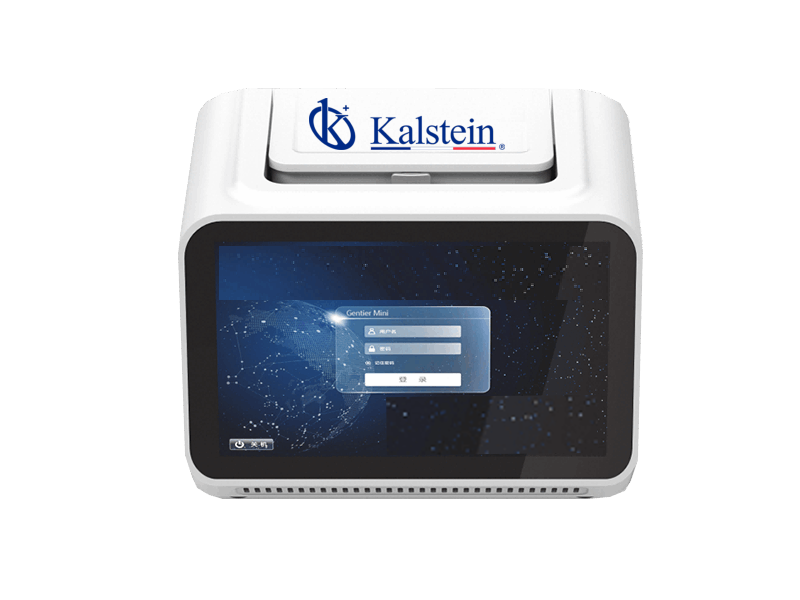
Troubleshooting Common Symptoms of the YR01867 Real-Time PCR System
The YR01867 Real-Time PCR System is a sophisticated and portable device designed to meet the demands of mobile laboratories, small labs, and field testing. Its high-quality performance and ability to function in limited spaces make it an ideal solution for scientific research, animal disease control, and food safety applications. However, like any advanced equipment, users may encounter issues that require troubleshooting. This guide provides detailed insights into common symptoms, probable causes, and effective solutions for the YR01867, ensuring optimal operation and performance.
Technical Specifications of the YR01867
| Specification | Details |
|---|---|
| Model | YR01867 |
| Performance | January 16 |
| Fluorescence Channels | 4 |
| Scanning Time | 1 second for all wells |
| Dye Compatibility | Channel 1: FAM, SYBR GreenⅠ, SYTO 9, Eva Green, LC Green; Channel 2: HEX, VIC, TET, JOE; Channel 3: Texas Red, ROX; Channel 4: Cy5 |
| Heating Rate | Average heating speed of 3.3℃/s; maximum heating speed of 5.0℃/s |
| Cooling Rate | Average cooling speed of 3.0℃/s; maximum cooling speed of 4.0℃/s |
| Temperature Accuracy | ≤0.1℃ |
| Light Source | High-brightness LED, long-life, maintenance-free |
| Special Temperature Protocols | Conventional PCR, touchdown PCR, long PCR, etc. |
| Hot Lid Temperature | 40℃-110℃ |
| Control Modes | Mode 1: YR01867 7-inch touchscreen; Mode 2: Software Programs; Mode 3: Remote control via Windows tablet |
| Key Applications | Qualitative analysis, absolute quantitative analysis, relative quantitative analysis, endpoint fluorescence analysis, melting curve analysis, SNP analysis, etc. |
| Result Analysis | 1: Direct analysis on YR01867 with results printable when connected to a thermal printer; 2: Analysis via PC software |
| Network Connection | Internet interface, USB, WiFi |
| Power Failure Protection | Automatic restart of experiments after power supply recovery |
| Specifications and Weight | 205mm(L) * 156mm(W) * 153mm(H); 3.2kg |
| Compatible Consumables | 0.2mL transparent single tubes and 8-strip tubes |
Troubleshooting by Symptom
To effectively troubleshoot the YR01867, we will categorize common symptoms and provide probable causes along with solutions. This structured approach will allow users to quickly identify issues and implement fixes.
Equipment Does Not Power On
This symptom can be frustrating. Here are the probable causes and solutions:
- Power Source Issue: Check if the power cable is securely connected to the outlet and the device. Ensure the outlet is functioning.
- Blown Fuse: Inspect the device’s fuse and replace it if necessary.
- Battery Failure: If operating on battery power, check the battery charge level and replace or recharge as needed.
Error Code E-03
Error code E-03 typically indicates a temperature-related issue. The following steps can help resolve it:
- Temperature Sensor Malfunction: Check the temperature sensor connections. If faulty, replace the sensor.
- Heating Element Failure: Inspect the heating element for damage. If it appears defective, consult a technician for replacement.
Inconsistent Readings
Inconsistent readings can compromise experimental results. Consider these potential causes:
- Improper Calibration: Recalibrate the device following the manufacturer’s guidelines to ensure accurate results.
- Contaminated Samples: Ensure that samples are free from contamination before running tests.
- Faulty Consumables: Use certified consumables only, as non-certified materials can lead to inaccuracies.
Frequent Overheating
Overheating can lead to device failure. Here are some causes and solutions:
- Insufficient Ventilation: Ensure the device has adequate airflow around it. Remove any obstructions that may block air circulation.
- High Ambient Temperature: Operate the device within the recommended temperature range. If the environment is too hot, relocate the device.
Symptom to Solution Matrix for YR01867
| Symptom | Probable Cause | Solution |
|---|---|---|
| Equipment Does Not Power On | Power source issue, blown fuse, battery failure | Check connections, replace fuse, recharge battery |
| Error Code E-03 | Temperature sensor malfunction, heating element failure | Check sensor, replace heating element if necessary |
| Inconsistent Readings | Improper calibration, contaminated samples, faulty consumables | Recalibrate, use clean samples, switch to certified consumables |
| Frequent Overheating | Insufficient ventilation, high ambient temperature | Ensure proper airflow, relocate to cooler environment |
Frequently Asked Questions
What should I do if the YR01867 does not turn on?
If the YR01867 does not power on, first check the power connections and outlet functionality. Ensure the fuse is intact and the battery is charged if applicable. If the problem persists, consult the manufacturer's support for further assistance.
How do I interpret the error codes displayed on the YR01867?
The YR01867 displays error codes to indicate specific issues. Each code corresponds to a particular malfunction or operational error. Refer to the user manual for detailed descriptions and troubleshooting steps for each error code.
Can I use third-party consumables with the YR01867?
While it may be tempting to utilize cheaper alternatives, it is highly recommended to use certified consumables designed for the YR01867. This ensures accurate results and prevents compatibility issues.
What maintenance is required for the YR01867?
Regular maintenance includes periodic calibration, cleaning of the exterior and interior components, and checking the integrity of consumables. Following manufacturer guidelines will help maintain optimal performance.
How can I improve the accuracy of my results with the YR01867?
To enhance accuracy, ensure proper calibration, use certified consumables, and implement best practices for sample preparation. Additionally, maintaining a controlled laboratory environment can significantly improve your results.
Is the YR01867 suitable for field use?
Yes, the YR01867 is specifically designed for portability and field applications, making it a valuable tool for mobile laboratories and remote testing scenarios.
How can I request a quote for the YR01867?
You can easily request a quote tailored to your specific needs through Kalstein Plus, where you can find various options available for the YR01867 model.
If you are looking for a fusion of innovation and quality, you have come to the right place. At Kalstein, we offer you the luxury of exploring our exclusive catalog of laboratory equipment. We manufacture every device to the highest standards of excellence. Our intuitive and seamless online purchasing channels are designed for your convenience, securing the most competitive prices. Hesitate no longer — we bring science to life, it is time to become part of our community.