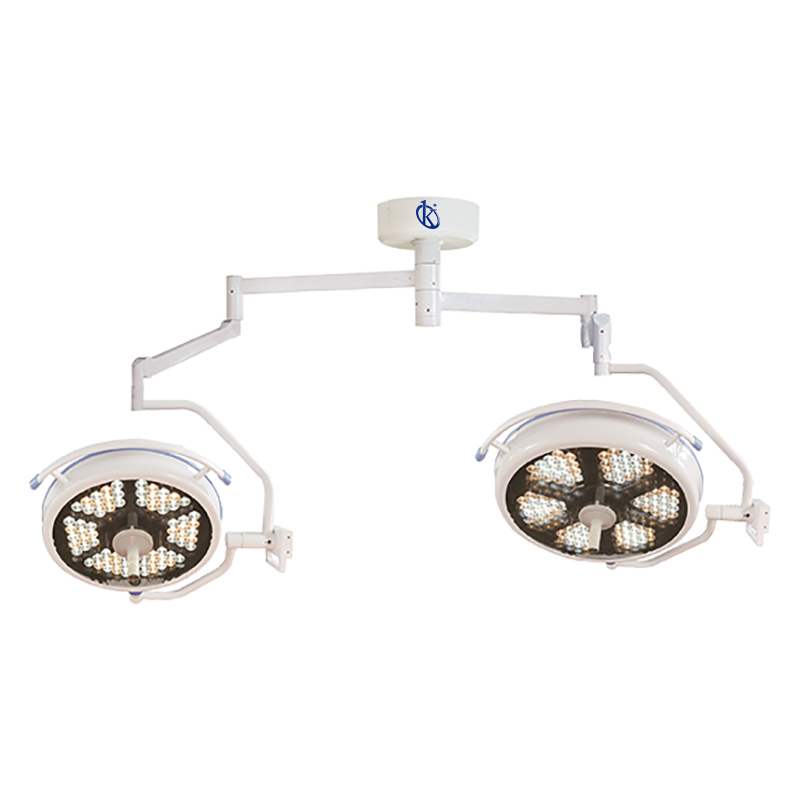
Troubleshooting Common Errors by Symptoms for the YR02111 Operation Lamp
The YR02111 Operation Lamp is a state-of-the-art device designed for efficient illumination in clinical settings. While it offers advanced features such as LED technology and a titanium alloy arm, users may occasionally encounter issues or error codes. This article focuses on common symptoms and the corresponding troubleshooting techniques to maintain optimal function.
Technical Specifications of the YR02111
| Model | Brand | Category | Price (USD) | Weight (kg) | Dimensions |
|---|---|---|---|---|---|
| YR02111 | Kalstein | Operation Lamp | 4786.00 | 170 | 128 x 48 x 73 |
Common Error Symptoms and Troubleshooting Steps
When operating the YR02111, users may face a variety of symptoms. Below are common issues and troubleshooting steps to address them effectively.
Equipment Does Not Power On
One of the more alarming issues is when the device fails to power on. Possible causes include:
- Power Supply Issues: Ensure the power supply is functioning properly.
- Loose Connections: Check that all connections are secure and correctly plugged in.
- Internal Fault: If these checks don't resolve the issue, there may be an internal fault, and the device may require professional servicing.
Error Code E-03
This specific error code may indicate a problem with the light source or power regulation. Troubleshooting steps include:
- Inspect the LED Module: Verify if the LED module is correctly seated and functioning.
- Check Voltage Stability: Ensure that the power supply maintains a stable voltage within designated parameters.
- Reset the Device: Sometimes, a simple reset can clear the error. Power down the device, wait a few moments, and power back up.
Inconsistent Illumination Levels
If you notice that the illumination levels vary, consider the following:
- Check for Obstructions: Ensure there are no physical obstructions blocking the light output.
- Review Color Temperature Settings: Confirm that the color temperature settings are correctly configured according to the requirements.
- Inspect for Environmental Factors: External factors like ambient light can affect perceived illumination. Adjust accordingly.
Touchscreen Not Responsive
In cases where the touchscreen does not respond, try these steps:
- Cleaning the Screen: Ensure the touchscreen is clean and free from any debris or liquid.
- Power Cycle the Device: Restart the device to refresh the system.
- Check for Firmware Updates: Ensure the device firmware is up to date, as updates may fix touchscreen issues.
Unusual Noise During Operation
If the lamp produces unusual noises, it may indicate:
- Check for Loose Parts: Inspect the assembly for loose components that may need tightening.
- Inspect Moving Parts: Ensure that the moving parts of the arm are lubricated and functioning smoothly.
- Seek Technical Assistance: If noises persist, consult technical support for further diagnosis.
Symptom to Cause to Solution Matrix
| Symptom | Probable Cause | Solution |
|---|---|---|
| Equipment Does Not Power On | Power supply issues, Loose connections | Check power supply, Secure connections |
| Error Code E-03 | Faulty LED module, Voltage instability | Inspect module, Check voltage |
| Inconsistent Illumination | Obstructions, Misconfigured settings | Remove obstructions, Adjust settings |
| Touchscreen Not Responsive | Screen debris, Software issues | Clean screen, Restart device |
| Unusual Noise | Loose parts, Lubrication needed | Inspect assembly, Lubricate parts |
Frequently Asked Questions
What should I do if the YR02111 does not power on?
If the YR02111 does not power on, first check the power supply and ensure all connections are secure. If the issue persists, consult technical support.
How can I resolve error code E-03 on my YR02111?
Error code E-03 typically indicates a problem with the LED module or voltage regulation. Inspect the module and ensure stable voltage supply to resolve this issue.
Is there a way to calibrate the illumination levels on the YR02111?
The illumination levels can be adjusted through specific settings on the touchscreen interface. Refer to the user manual for detailed calibration instructions.
What maintenance is required for the YR02111 Operation Lamp?
Regular maintenance includes cleaning the unit, checking for loose components, and ensuring the LED module is functional. Consult the maintenance section of the user manual for comprehensive guidelines.
Can I replace the LED module on my YR02111?
Yes, the LED module can be replaced. It is advisable to contact technical support or refer to the service manual for detailed replacement instructions.
For professional support or to request a quote on the YR02111 Operation Lamp, please reach out to us.
If you are looking for a fusion of innovation and quality, you have come to the right place. At Kalstein, we offer you the luxury of exploring our exclusive catalog of laboratory equipment. We manufacture every device to the highest standards of excellence. Our intuitive and seamless online purchasing channels are designed for your convenience, securing the most competitive prices. Hesitate no longer — we bring science to life, it is time to become part of our community.