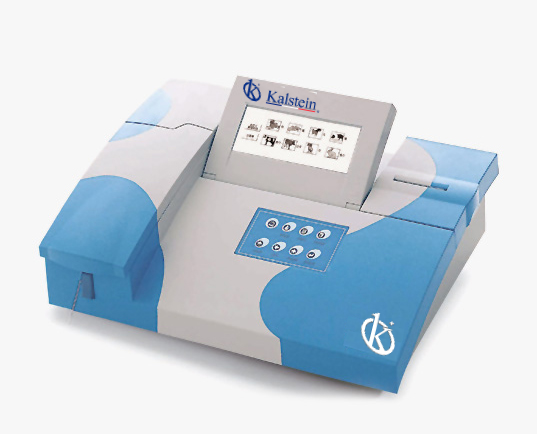
Troubleshooting Common Errors in the YR06077 Veterinary Analyzer
The YR06077 Veterinary Analyzer is a sophisticated piece of equipment designed to perform a wide range of chemical analyses on animal samples. Its advanced features offer incredible versatility, but like any technical device, it may encounter issues that require troubleshooting. This guide focuses on common error symptoms, their probable causes, and steps to resolve them.
Technical Specifications of YR06077
| Model | YR06077 |
|---|---|
| Principle | Absorbance |
| Photometric Range | -0.500-3.500Abs |
| Resolution | 0.001Abs (displayed), 0.0001Abs (calculated) |
| Light Source | Halogen Lamp |
| Wavelengths | 340, 405, 500, 546, 578, 620, 670nm |
| Wavelength Accuracy | ±2nm |
| Bandwidth | 10nm |
| Transfer | <1% |
| Memory | 200 test parameters, up to 3000 sample results |
| Interface | RS-232, USB, SD card interface |
| Flow Cell | 25ul Metal-quartz flow cell |
| Cuvette Mode | Optional cuvette 12.5mm*12.5mm |
| Temperature Control | 25 C, 30C, 37 C; ±0.5 C and ambient temperature |
| Display | 7" Color LCD (640*240 resolution, 256 colors) |
| Input | USB mouse and external keyboard |
| Output | Built-in printer or external printer (optional) |
| Dimensions (mm) | 460*330*190 |
| Power Supply | AC 110V/220V. 50Hz/60Hz |
Troubleshooting by Symptom
Equipment Does Not Power On
If the YR06077 does not power on, it may be due to a few common issues:
- Check the power supply and ensure it is connected properly.
- Inspect the power cord for damage or wear.
- Verify that the power outlet is functional by testing it with another device.
Error Code E-03
This error code may indicate a malfunction within the optical system:
- Ensure that the flow cell is clean and free from obstructions.
- Check the light source to confirm it is functioning properly.
- Restart the analyzer to reset any temporary faults.
Inconsistent Readings
Inconsistent readings can be frustrating and may stem from several causes:
- Calibrate the instrument prior to testing.
- Check the sample preparation methods for consistency.
- Examine the calibration curves used; they should be accurately established.
Symptom to Cause and Solution Matrix
| Symptom | Probable Cause | Recommended Solution |
|---|---|---|
| Equipment Does Not Power On | Power supply failure | Check connections and test power outlet |
| Error Code E-03 | Optical malfunction | Clean flow cell and check the light source |
| Inconsistent Readings | Calibration issues | Perform calibration and check sample consistency |
Common Errors and Their Solutions
Overheating Issues
If the YR06077 shows signs of overheating, this can be resolved by:
- Ensuring adequate ventilation around the device.
- Checking the temperature settings and cooling system functionality.
- Allowing the analyzer to cool down before further use.
Display Malfunctions
Display issues may arise due to software or hardware faults:
- Restart the device to resolve temporary glitches.
- Inspect cables and connections related to the display.
- Update the software if applicable to ensure optimal performance.
Frequently Asked Questions
What are the best practices for maintaining the YR06077?
Regular maintenance of the YR06077 includes cleaning the flow cell, calibrating the analyzer before use, and ensuring that all connections are secure and functional.
How do I handle error codes on the YR06077?
Error codes should be noted and referenced against the troubleshooting guide provided by the manufacturer. Each code corresponds to a specific issue that can often be resolved through simple steps.
What types of samples can the YR06077 analyze?
The YR06077 can analyze samples from up to 12 types of animals, with 34 predefined tests and additional customizable options for further analyses.
How can I ensure accurate readings from the YR06077?
To ensure accurate readings, perform regular calibrations, prepare samples consistently, and maintain the equipment according to the manufacturer's specifications.
Is there a warranty for the YR06077?
Yes, the YR06077 typically comes with a standard warranty that covers manufacturing defects. Review the specific terms provided at the time of purchase.
What should I do if the screen freezes during operation?
If the screen freezes, restart the analyzer. If the issue persists, check for software updates and contact support for further assistance.
Where can I request a quote for the YR06077?
Please visit relevant channels to request a quote for the YR06077 Veterinary Analyzer.
If you are looking for a fusion of innovation and quality, you have come to the right place. At Kalstein, we offer you the luxury of exploring our exclusive catalog of laboratory equipment. We manufacture every device to the highest standards of excellence. Our intuitive and seamless online purchasing channels are designed for your convenience, securing the most competitive prices. Hesitate no longer — we bring science to life, it is time to become part of our community.