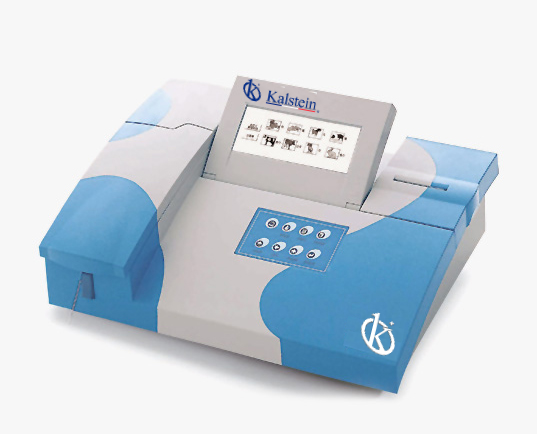
Troubleshooting Common Errors on the YR06077 Veterinary Analyzer
The YR06077 Veterinary Analyzer is an advanced device designed for efficient chemical analysis in veterinary contexts. However, like any sophisticated equipment, it may encounter errors that can disrupt workflows. This article will delve into common error symptoms associated with the YR06077 and provide detailed troubleshooting steps to resolve these issues effectively.
Understanding the YR06077 Veterinary Analyzer
The YR06077 operates on the principle of absorbance, facilitating the analysis of biological samples from various animal species. It supports up to 12 different types of animals with a wide range of fixed and user-defined tests. Its dual-wavelength optical system enhances accuracy, making it essential for veterinary practices.
Technical Specifications of the YR06077
| Specification | Details |
|---|---|
| Model | YR06077 |
| Principle | Absorbance |
| Photometric Range | -0.500-3.500 Abs |
| Resolution | 0.001 Abs (displayed), 0.0001 Abs (calculated) |
| Light Source | Halogen Lamp |
| Wavelengths | 340, 405, 500, 546, 578, 620, 670 nm (1 optional filter) |
| Memory | 200 test parameters, up to 3000 sample results |
| Interface | RS-232, USB, SD card interface |
| Dimensions (mm) | 460 x 330 x 190 |
| Power Supply | AC 110V/220V, 50Hz/60Hz |
Common Error Symptoms and Troubleshooting Steps
Identifying and resolving errors can enhance the longevity and functionality of the YR06077. Below, we classify common symptoms and their corresponding troubleshooting procedures.
1. Equipment Does Not Power On
If the YR06077 does not power on, check the following:
- Ensure the power cord is securely connected to the device and the outlet.
- Check the power outlet by plugging in another device to confirm functionality.
- Inspect the fuse in the power supply if applicable, and replace if necessary.
2. Error Code E-03 Appears
Error code E-03 may indicate a malfunction in the optical system:
- First, inspect the halogen lamp for proper installation and functionality.
- Check the optical path for any obstructions or dirt that may affect performance.
- Restart the analyzer after addressing the above issues to reset the error.
3. Inconsistent Readings
Inconsistent readings can stem from several factors:
- Ensure that the optical components are clean and free from any residue.
- Verify that the samples are prepared correctly and that the reagents are within the expiration date.
- Calibrate the analyzer frequently to maintain accuracy.
4. Printer Malfunction
If the built-in printer is not functioning:
- Check the printer connection to the device and ensure it is powered on.
- Replace the paper if it has run out.
- Perform a printer test to ensure it is operational.
5. Data Not Saving
Issues with saving data can occur due to various reasons:
- Ensure that the SD card is properly inserted and is not full.
- Check if the SD card is formatted correctly for the device.
- Restart the device and try saving again.
Symptom-Cause-Solution Table
| Symptom | Probable Cause | Solution |
|---|---|---|
| Equipment Does Not Power On | Loose connections or faulty power outlet | Check connections and try a different outlet |
| Error Code E-03 | Optical system malfunction | Inspect the lamp and clean the optical path |
| Inconsistent Readings | Dirty optics or incorrect sample preparation | Clean optics and check sample protocols |
| Printer Malfunction | Power or connection issues | Check printer settings and connections |
| Data Not Saving | SD card issues | Check and format the SD card |
Frequently Asked Questions
What should I do if the YR06077 shows an error code?
Start by identifying the error code displayed. Refer to the user manual for specific troubleshooting steps associated with that error. Common resolutions often include checking connections, cleaning parts, or recalibrating the device.
How can I ensure accurate readings from the YR06077?
To ensure accuracy, regularly calibrate the device, clean the optical components, and follow correct sample handling and analysis protocols. Utilizing fresh reagents is also critical.
What maintenance is required for the YR06077?
Regular maintenance includes cleaning the optical system, checking the calibration, and replacing the halogen lamp as needed. Additionally, monitor the condition of the SD card and printer for effective operation.
Can I use the YR06077 for different animal types?
Yes, the YR06077 supports analysis for up to 12 types of animals. It comes with a preset list of tests along with options to define custom tests based on specific requirements.
What are the benefits of using the YR06077 in a clinical setting?
The YR06077 offers rapid analysis, high accuracy, and the ability to handle a variety of tests, making it ideal for veterinary clinics focused on efficient diagnosis and treatment.
How do I update the software on the YR06077?
Software updates can be performed easily via the SD card slot. Download the latest firmware from the manufacturer’s resources and transfer it onto the SD card, then insert it into the analyzer to initiate the update.
Conclusion
Maintaining the YR06077 Veterinary Analyzer and addressing common errors can significantly enhance its functionality and longevity. Regular troubleshooting and preventive measures will ensure the analyzer operates at peak performance. If you are looking for a fusion of innovation and quality, you have come to the right place. At Kalstein, we offer you the luxury of exploring our exclusive catalog of laboratory equipment. We manufacture every device to the highest standards of excellence. Our intuitive and seamless online purchasing channels are designed for your convenience, securing the most competitive prices. Hesitate no longer — we bring science to life, it is time to become part of our community.