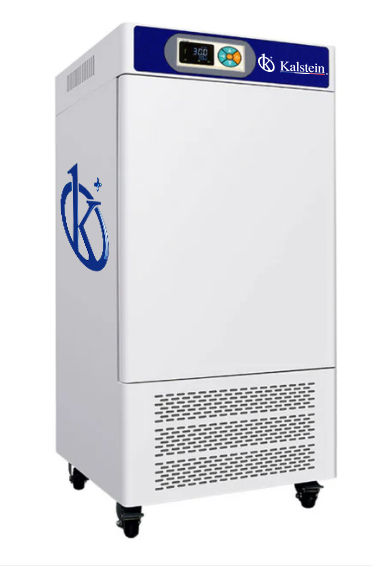
Troubleshooting Common Errors in the YR05804 Humidity Chamber
The YR05804 humidity chamber is a sophisticated piece of laboratory equipment designed to maintain constant temperature and humidity levels for various applications, including environmental testing, drug testing, and biological studies. However, like any technical device, it can experience issues that may hinder its performance. This article provides a comprehensive guide to troubleshooting common errors associated with the YR05804 humidity chamber, structured by specific symptoms.
Technical Specifications of the YR05804
| Model | YR05804 |
|---|---|
| Temperature Range (°C) | 0~60 |
| Precision (°C) | ±0.1 |
| Time Range | 0~999 minutes |
| Fluctuation (%) | ±0.5 |
| Voltage (V) | 220 |
| Power (kW) | 0.8 |
| Interior Size (mm) (H x W x D) | 1000×550×450/250L |
| Total Dimensions (mm) (H x W x D) | 1550×690×660 |
| Net Weight (kg) | 133 |
| Shipping Weight (kg) | 155 |
Symptom: Equipment Does Not Power On
If the YR05804 does not power on, this may indicate several underlying issues.
- Check Power Supply: Ensure that the unit is plugged in and that the outlet is functioning. You can test the outlet by plugging in another device.
- Inspect Power Cord: Examine the power cord for any visible damage or fraying. A damaged power cord may prevent the equipment from receiving power.
- Reset Circuit Breakers: Check if any circuit breakers have tripped. Resetting these may restore power to the chamber.
Symptom: Error Code E-03
Error codes can be confusing without proper understanding. The E-03 error code on the YR05804 indicates a humidity sensor issue.
- Sensor Calibration: Calibrate the humidity sensor according to the user manual. Improper calibration can lead to erroneous readings.
- Check Sensor Connections: Inspect the wiring and connectors to ensure they are secure and not corroded.
- Replace Sensor if Necessary: If after troubleshooting, the error persists, consider replacing the humidity sensor.
Symptom: Inconsistent Readings
Inconsistent readings can compromise experimental results and lead to unnecessary troubleshooting.
- Verify Environmental Conditions: Ensure that the ambient conditions around the unit are stable and within the operational limits.
- Inspect Calibration Settings: Regularly calibrate the humidity and temperature settings to maintain accuracy.
- Check for Air Leaks: Inspect the chamber for any leaks that may affect humidity levels. Ensure the door seals are intact and functioning correctly.
Symptom: Humidity Levels Not Achieved
The YR05804 may fail to reach desired humidity levels due to several factors.
- Water Supply Issues: Ensure that the water tank is filled and there are no blockages in the water supply line.
- Humidifier Malfunction: The humidifier may require maintenance or replacement if it is not functioning as intended.
- High Temperature Interference: Excessive temperature settings may hinder the unit's ability to maintain humidity. Adjust settings to appropriate levels.
Symptom: Temperature Fluctuations
Temperature stability is crucial for the YR05804's performance.
- Check Insulation: Inspect for any insulation failures that could lead to heat loss.
- Verify Sensor Functionality: A faulty temperature sensor can provide incorrect readings, leading to fluctuations. Consider testing or replacing it.
- Adjust Ventilation: Ensure that the unit has adequate ventilation and is not placed near heat sources or direct sunlight.
Symptom: Alarm Activations
Frequent alarm activations may indicate a malfunction or improper settings.
- Review Alarm Settings: Check if alarm thresholds are set correctly in the control unit.
- Assess Environmental Conditions: External factors like fluctuations in room temperature or humidity can trigger alarms.
- Conduct Regular Maintenance: Ensure that all components of the humidity chamber are regularly maintained to prevent malfunction.
Symptom-Cause-Solution Matrix for YR05804
| Symptom | Possible Cause | Solution |
|---|---|---|
| Equipment Does Not Power On | Power supply issues | Check outlet and power cord |
| Error Code E-03 | Humidity sensor issue | Calibrate or replace sensor |
| Inconsistent Readings | Environmental instability | Stabilize external conditions |
| Humidity Levels Not Achieved | Water supply problems | Fill water tank and check lines |
| Temperature Fluctuations | Insulation failure | Inspect and repair insulation |
| Alarm Activations | Improper settings | Review and adjust alarm settings |
Frequently Asked Questions
What are the common error codes for the YR05804 humidity chamber?
The common error codes for the YR05804 include E-01 for temperature sensor failure, E-02 for humidity sensor error, and E-03 which indicates a humidity sensor issue. Each code corresponds to specific troubleshooting steps outlined in the manual.
How can I maintain the YR05804 humidity chamber?
Maintenance of the YR05804 includes regular calibration of sensors, cleaning of the humidification system, checking for air leaks, and ensuring that all electrical connections are secure. Regular checks can help prevent common issues and extend the lifespan of the equipment.
What is the optimal operating environment for the YR05804?
The optimal operating environment for the YR05804 includes stable room temperature and humidity levels, proper ventilation, and a power supply that meets the specifications outlined in the user manual. Avoid placing the unit in direct sunlight or near heat sources.
How frequently should the sensors in the YR05804 be calibrated?
Sensors in the YR05804 should be calibrated every six months or as frequently as necessary, especially if discrepancies in readings are observed. Regular calibration ensures accuracy in measurements and reliable performance.
Can the YR05804 be used for food safety testing?
Yes, the YR05804 can be used for food safety testing, as it maintains precise temperature and humidity levels necessary for various food testing protocols. Ensure that the chamber is appropriately cleaned before and after experiments to avoid cross-contamination.
What should I do if I encounter a persistent error code?
If a persistent error code appears, first consult the user manual for troubleshooting steps specific to that code. If the issue is not resolved, consider contacting technical support or a qualified technician for further assistance.
If you are looking for a fusion of innovation and quality, you have come to the right place. At Kalstein, we offer you the luxury of exploring our exclusive catalog of laboratory equipment. We manufacture every device to the highest standards of excellence. Our intuitive and seamless online purchasing channels are designed for your convenience, securing the most competitive prices. Hesitate no longer — we bring science to life, it is time to become part of our community.