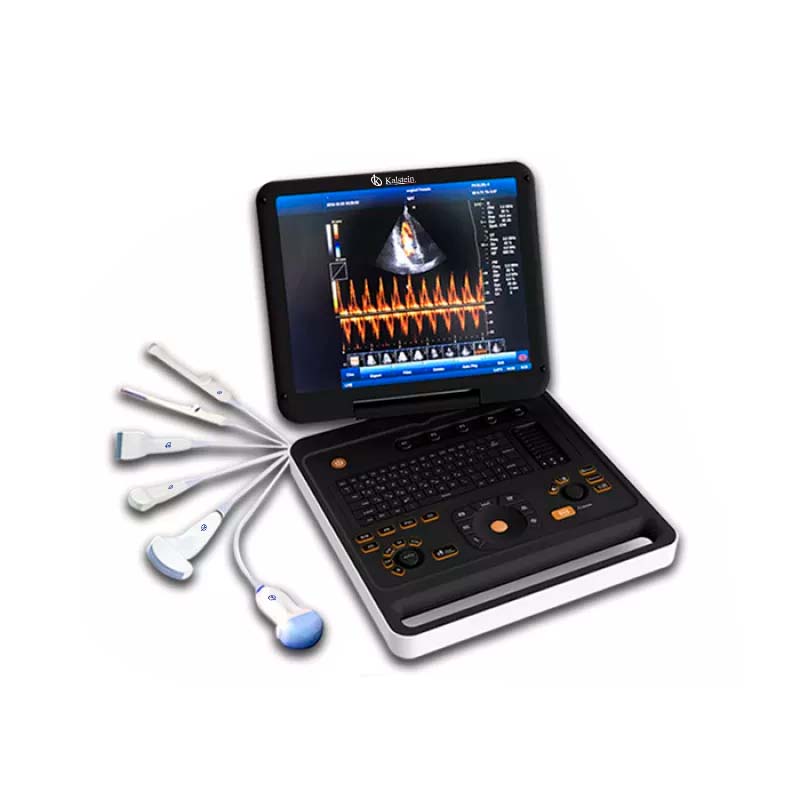
Troubleshooting Common Errors on the YR05150: A Practical Guide
The YR05150 is a sophisticated Doppler Color ultrasound device designed for various medical applications. However, like any technical equipment, it may encounter issues during operation. This guide focuses on frequent errors and their troubleshooting techniques, ensuring operators can maintain the device's functionality and reliability.
Understanding the YR05150
The YR05150 is equipped with advanced features such as a 15-inch color LED screen, multiple imaging modes, and a built-in battery that allows at least three hours of continuous operation. Understanding its functionalities and potential issues is crucial for effective troubleshooting.
Technical Data on YR05150
| Model Number | YR05150 |
|---|---|
| Warranty | 2 years |
| Post-Sale Service | Return and replacement |
| Instrument Classification | Class II |
| Type | High-quality portable color Doppler ultrasound diagnostic device |
| Image Mode | 2D, 3D, simultaneous CF + B, PDI, DPDI, TDI, TSI, etc. |
| User Rights Control | YES |
| Probe Connectors | 2 |
| PW duplex and triplex switching | YES |
| Automatic IMT Measurement | YES |
| CW Function | YES |
| Complex Model Imaging | YES |
| Automatic PW Follow-up Measurements | YES |
| Software Package | General, OB/GYN, small parts, Urology, Cardiac |
Common Symptoms and Troubleshooting Steps
This section details symptoms that users may encounter while using the YR05150 and offers systematic troubleshooting steps for each issue.
Equipment Does Not Power On
When the YR05150 fails to power on, it can halt operations. Possible reasons include:
- Battery is depleted.
- Power adapter malfunction.
- Internal fuse is blown.
To troubleshoot:
- Check the battery level and recharge if necessary.
- Inspect the power adapter and connections, replacing it if damaged.
- Consult the manual for guidance on checking the internal fuse.
Error Code E-03
Error code E-03 typically indicates a probe error. This may be caused by:
- Improper probe connection.
- Damaged probe.
- Software error.
To resolve this issue:
- Ensure the probe is securely connected to the device.
- Inspect the probe for physical damage.
- Restart the device to reset the software.
Inconsistent Readings
Inconsistent readings can lead to inaccurate diagnostics. Possible causes include:
- Incorrect settings for imaging mode.
- Obstructions or interference during scanning.
- Calibration issues.
To troubleshoot:
- Verify that the correct imaging mode is selected for the examination.
- Check for any obstructions affecting the probe’s line of sight.
- Conduct a calibration check following the manufacturer’s instructions.
Symptom-Cause-Solution Table
| Symptom | Probable Causes | Solutions |
|---|---|---|
| Equipment does not power on | Depleted battery, malfunctioning adapter, blown fuse | Recharge battery, inspect adapter, check fuse |
| Error code E-03 | Improper probe connection, damaged probe, software error | Secure connection, inspect probe, restart device |
| Inconsistent readings | Incorrect imaging mode, obstructions, calibration issues | Verify settings, check for obstructions, recalibrate |
Preventive Maintenance for YR05150
Regular maintenance plays a key role in preventing errors and ensuring optimal performance. Some essential maintenance tasks include:
- Regularly inspect and clean the probe and connectors.
- Perform software updates as recommended by the manufacturer.
- Schedule periodic calibration checks to maintain measurement accuracy.
Frequently Asked Questions
What should I do if the YR05150 shows a strange error message?
If you encounter an unfamiliar error message, first refer to the user manual for error codes. If the issue persists, perform a device restart. If the error continues, contact customer support for further assistance.
How can I extend the battery life of the YR05150?
To maximize battery life, ensure that the device is powered down when not in use. Regularly charging the battery and not allowing it to deplete completely will also help in extending its lifespan.
What imaging modes are available in the YR05150?
The YR05150 supports multiple imaging modes, including B, 2B, 4B, M, Color Doppler, and 3D imaging modes, allowing versatility for various diagnostic applications.
Is there a warranty on the YR05150?
Yes, the YR05150 comes with a two-year warranty, covering manufacturing defects and offering service options for replacements.
How often should calibration be performed on the YR05150?
Calibration should be performed at least once every six months, or more frequently depending on usage intensity and regulatory requirements.
Where can I find replacement parts for the YR05150?
Replacement parts can be obtained directly from authorized suppliers or through the manufacturer’s support channels. Ensure compatibility when ordering.
How can I request a quote for the YR05150?
You can request a quote by reaching out directly to our sales team or visiting our contact page.
If you are looking for a fusion of innovation and quality, you have come to the right place. At Kalstein, we offer you the luxury of exploring our exclusive catalog of laboratory equipment. We manufacture every device to the highest standards of excellence. Our intuitive and seamless online purchasing channels are designed for your convenience, securing the most competitive prices. Hesitate no longer — we bring science to life, it is time to become part of our community.