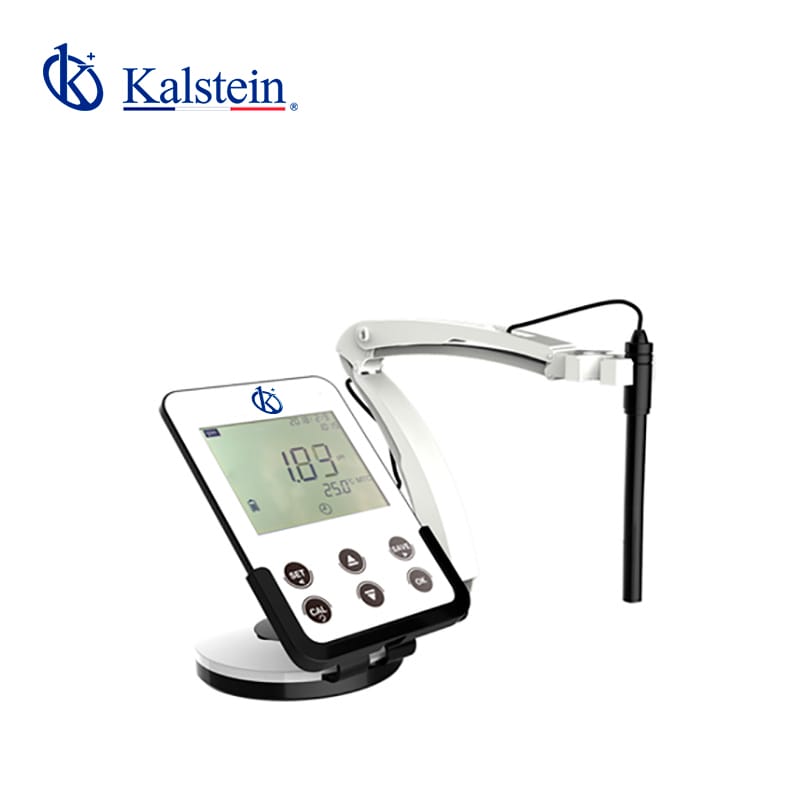
Installation and Startup Guide for the YR01826 Desktop pH/Ion Meter
The YR01826 Desktop pH/Ion Meter is a sophisticated device that offers advanced features for precise measurements in various laboratory settings. This guide provides detailed instructions for installing and starting up your YR01826, ensuring optimal performance from the very first use.
Unboxing and Initial Setup
Upon receiving your YR01826, carefully unbox the device and check for all included components. The package should contain:
- YR01826 pH/Ion Meter
- Two-in-one electrode (pH combination electrode and temperature probe)
- Electrode holder
- pH buffer solution
- Power adapter
- User manual
Physical Installation Requirements
To ensure accurate measurements, the YR01826 should be placed on a stable, level surface. Check the following:
- Environment should be within the specified temperature range of 0~100 °C.
- Avoid direct sunlight, strong vibrations, and electromagnetic interference.
- Ensure sufficient clearance around the device for proper airflow.
Connecting the Device
Connect the power adapter to the YR01826 and plug it into a power outlet. Ensure that the device is grounded to prevent electrical interference. It is equipped with dual USB interfaces for data transfer and charging, making it versatile for various laboratory applications.
First Power-Up and Calibration
After connecting, turn on the device using the power button. The LCD display will light up, showing the initial startup screen. Proceed with the first calibration:
- Prepare the pH buffer solutions for calibration — select buffer solutions that match the calibration points (1, 2, or 3 points).
- Follow the on-screen instructions to calibrate the meter, ensuring accurate readings.
- For best results, allow the electrode to stabilize in each buffer solution before recording the values.
Understanding the Display and Functions
The YR01826 features a 5-inch LCD screen with a 150° viewing angle, ensuring clear readings even from a distance. Key functions include:
- Automatic temperature compensation (ATC) for accurate measurements.
- Data storage capability for up to 200 sets of data, including readings and GLP data.
- Low battery alarm indicator to manage power efficiently.
Validation of First Measurement
Once calibrated, validate your first measurement by following these steps:
- Insert the electrode into a calibration buffer solution.
- Wait for the reading to stabilize on the display.
- Record the value and compare it with the expected pH of the buffer solution.
Common Setup Mistakes to Avoid
While installing and setting up your YR01826, avoid these common mistakes:
- Neglecting to calibrate the device before the first use.
- Using incompatible buffer solutions.
- Failing to ensure the device is level, which can lead to inaccurate readings.
Technical Specifications of the YR01826
| Specification | Details |
|---|---|
| Model | YR01826 |
| Measuring Range (pH) | (-2~19.999)pH |
| Resolution | 0.1/0.01pH |
| Accuracy | ±0.02 pH |
| Input Current | ≤2×10^-12 A |
| Input Impedance | 21×10^-12 Ω |
| Display | 5-Inch white backlit LCD screen |
| Data Storage | 200 sets |
| Power | DC 5V/1A |
| Dimension/N.W. | 180 x 130 x 14mm / 280g |
Frequently Asked Questions
What should I do if the YR01826 does not power on?
If the YR01826 does not power on, check the power connection. Ensure that the power adapter is plugged in properly and that there is power to the outlet. If the device still does not turn on, check for any internal fuse issues or consider contacting customer support.
How do I calibrate the YR01826 after initial setup?
Calibration is crucial for accurate measurements. To calibrate the YR01826, prepare your pH buffer solutions and follow the on-screen instructions to set the calibration points as needed. Ensure the electrode is rinsed properly between different buffers to avoid contamination.
What type of buffer solutions are compatible with the YR01826?
The YR01826 can recognize 15 different buffer solutions compatible with European, US, NIST, and Chinese standards. It is important to use appropriate buffer solutions that fit the calibration requirements for accurate readings.
What maintenance is required for the YR01826?
Regular maintenance of the YR01826 includes cleaning the electrode, checking the calibration before each use, and storing the device properly when not in use. Follow the manufacturer's guidelines for specific cleaning and maintenance procedures.
Can the YR01826 be used in various laboratory environments?
Yes, the YR01826 is designed for laboratory use across various environments, including clinical, industrial, food, and educational settings. However, ensure that the environmental conditions meet the specifications outlined in the user manual for optimal performance.
How can I store data on the YR01826?
The YR01826 allows you to store up to 200 sets of data, which can include readings and GLP data. Use the save function during measurement to record the data, and retrieve it later from the data storage menu.
Conclusion
Setting up the YR01826 Desktop pH/Ion Meter correctly is essential for achieving accurate measurements in your laboratory applications. By following this installation and startup guide, you can ensure that your device is ready for use and delivering reliable results. For any further inquiries or to request a quote, please consult with our sales team.
If you are looking for a fusion of innovation and quality, you have come to the right place. At Kalstein, we offer you the luxury of exploring our exclusive catalog of laboratory equipment. We manufacture every device to the highest standards of excellence. Our intuitive and seamless online purchasing channels are designed for your convenience, securing the most competitive prices. Hesitate no longer — we bring science to life, it is time to become part of our community.