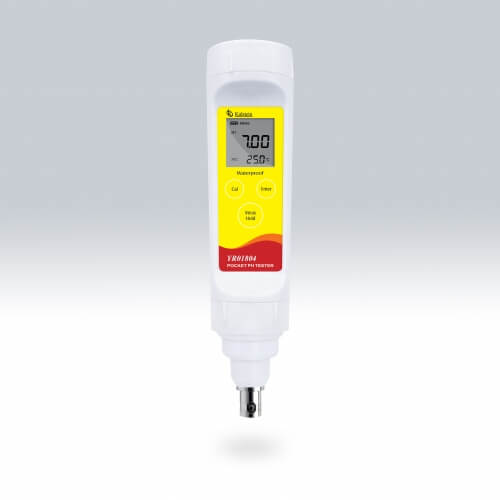
Installation and Startup Guide for the YR01804 Pocket pH Meter
Understanding how to properly install and start the YR01804 Pocket pH Meter is essential for achieving accurate measurements in various applications. In this guide, we will explore the critical steps involved in the installation and commissioning of the YR01804, ensuring you maximize its functionality and reliability.
Unboxing Checklist
Before diving into the installation, it is important to ensure that you have all the necessary components. Here’s what to check for when unboxing the YR01804 Pocket pH Meter:
- YR01804 Pocket pH Meter
- Plastic body pH electrode
- Calibration solutions (pH 4.01, 7.00, 10.01)
- 2 AAA batteries
- Carrying case
- User manual
Anchoring and Leveling
The YR01804 is a compact device, but for optimal performance, it’s important to ensure it is level during use. Position the meter on a stable, flat surface. If you are using the meter in a field setting, consider using a portable stand to keep it upright.
While anchoring is not typically required for portable meters, ensuring stability during readings will enhance accuracy, especially in outdoor environments.
Power-Up Sequence
To power up the YR01804, follow these steps:
- Insert the provided AAA batteries into the battery compartment, ensuring correct polarity.
- Press the power button to turn on the device.
- Wait for the display to initialize, which may take a few seconds.
First-Run Calibration
Calibration is crucial for accurate pH measurement. The YR01804 allows for calibration at 1 to 3 points with automatic buffer recognition. Follow these steps:
- Prepare the calibration solutions in clean containers.
- Submerge the pH electrode in the first calibration solution (e.g., pH 7.00).
- Select the calibration mode on the device and follow the prompts on the display.
- Once calibrated, rinse the electrode with distilled water before measuring other solutions.
For best results, calibrate the meter before each use, especially if accuracy is critical.
Validation of First Measurement
After calibration, it is important to validate the first measurement:
- Submerge the electrode in the sample solution you want to test.
- Allow the reading to stabilize on the display.
- Record the measurement and compare it against known values to validate accuracy.
Common Setup Mistakes
While setting up the YR01804, keep an eye out for these common mistakes:
- Not calibrating the device before use.
- Using contaminated or expired calibration solutions.
- Improperly inserting batteries or using dead batteries.
- Neglecting to rinse the electrode between measurements.
Avoiding these pitfalls will contribute significantly to the accuracy and reliability of your measurements.
Technical Specifications
| Specification | Details |
|---|---|
| Model | YR01804 |
| pH Range | -1.00 to 15.00 pH |
| pH Precision | ± 0.01 pH |
| Calibration Points | 1 to 3 points |
| Calibration Solutions | USA (pH 4.01/7.00/10.01) or NIST (pH 4.01/6.86/9.18) |
| Temperature Compensation | 0 to 100 °C (32 to 212 °F) Manual |
| Power Supply | Manual or automatic (shuts off 8 minutes after last key press) |
| Reset Function | Yes |
| Connector | BNC |
| Operating Temperature | 0 to 60 °C (32 to 140 °F) |
| Power Requirements | 2 x 1.5V AAA batteries |
| Battery Life | Approximately 200 hours |
| Dimensions | 175 (L) x 40 (Dia) mm |
| Weight | 100 g |
Frequently Asked Questions
What is the best method for calibrating the YR01804 Pocket pH Meter?
The best method involves using fresh, uncontaminated calibration solutions, ensuring the pH electrode is clean, and performing a 3-point calibration with buffer solutions at pH 4.01, 7.00, and 10.01.
How do I know when the YR01804 needs calibration?
The YR01804 should be calibrated before every use, especially for critical measurements. If the readings fluctuate or show inconsistency, recalibration is recommended.
Can I use the YR01804 for measuring pH in industrial applications?
Yes, the YR01804 is suitable for various industrial applications, including water treatment and environmental monitoring, provided the appropriate calibration and maintenance are followed.
How can I extend the battery life of the YR01804?
To extend battery life, ensure the meter is turned off when not in use, and replace batteries when they show signs of low power. Avoid using the device in extreme conditions that may drain the battery faster.
What should I do if the YR01804 displays an error code?
Refer to the user manual for specific error code troubleshooting. Common issues may include calibration errors or electrode problems. Ensure the electrode is properly connected, and consider recalibrating the meter.
Is the YR01804 waterproof?
The YR01804 is designed for outdoor use, but it is not fully waterproof. Avoid submerging the device in water, and clean the electrode according to manufacturer instructions.
How do I maintain the electrode of the YR01804?
Regularly rinse the pH electrode with distilled water after use, and store it in a suitable storage solution as recommended by the manufacturer to prolong its life and maintain accuracy.
If you are looking for a fusion of innovation and quality, you have come to the right place. At Kalstein, we offer you the luxury of exploring our exclusive catalog of laboratory equipment. We manufacture every device to the highest standards of excellence. Our intuitive and seamless online purchasing channels are designed for your convenience, securing the most competitive prices. Hesitate no longer — we bring science to life, it is time to become part of our community.