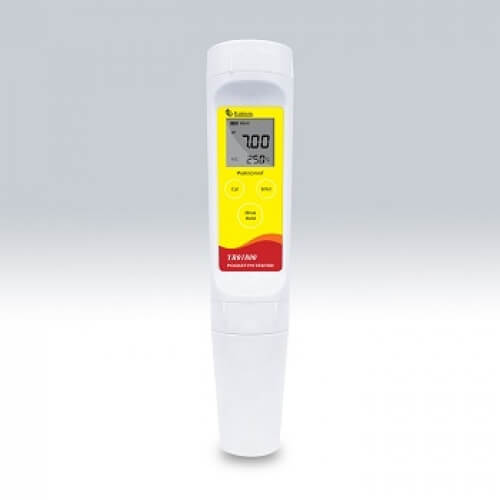
Installation and Startup Guide for the YR01802 Pocket pH Meter
The YR01802 Pocket pH Meter is a high-precision device designed for accurate pH measurements. This guide focuses on the installation and startup process to ensure optimal performance and reliability in various applications. Whether you are working in clinical laboratories, industrial settings, or educational environments, this guide will provide you with the necessary steps to get your YR01802 up and running efficiently.
Understanding the YR01802 Pocket pH Meter
The YR01802 Pocket pH Meter features a dual LCD display and a flat surface pH electrode suitable for semi-solid measurements. With a calibration range of 1 to 3 points and automatic temperature compensation, it is designed to deliver accurate readings across a variety of conditions. The device supports buffer recognition for both U.S. and NIST standards, making it versatile for different environments.
Technical Specifications of the YR01802
| Model | YR01802 | YR01802-1 |
|---|---|---|
| pH Range | -1.00 to 15.00 pH | - |
| Resolution | 0.01 pH | - |
| Accuracy | ± 0.01 pH | - |
| Calibration Points | 1 to 3 points | - |
| Temperature Range | 0 to 60 °C / 32 to 140 °F | - |
| Power Supply | 2 x 1.5V AAA batteries | - |
| Dimensions | 185 x 40 mm | - |
| Weight | 100 grams | - |
Unboxing and Initial Setup
Before powering up your YR01802 Pocket pH Meter, ensure that you have all components included in the package:
- YR01802 Pocket pH Meter
- Calibration buffer packets (pH 4.01, 7.00, 10.01)
- Protective case
- 2 AAA batteries
- User manual
Inspect the device for any physical damage and ensure that all items are intact. The next step involves inserting the batteries correctly and ensuring they are functioning. The battery compartment is located at the back of the device.
Calibration Process
The YR01802 allows for calibration at 1 to 3 points. Follow these steps for the calibration process:
- Turn on the device and allow it to stabilize for a few minutes.
- Prepare calibration buffers (pH 4.01, 7.00, 10.01) in separate containers.
- Immerse the electrode in the first buffer solution and press the calibrate button.
- Wait for the reading to stabilize and follow the prompts on the screen to complete the calibration.
- Repeat the process with the remaining buffers if using a multi-point calibration.
During calibration, ensure that the electrode is clean and properly rinsed between measurements to avoid contamination.
Common Startup Issues and Troubleshooting
After installation and calibration, you may encounter some common issues. Here are some potential problems and their solutions:
| Symptom | Cause | Solution |
|---|---|---|
| Device does not power on | Battery issue | Replace batteries and ensure they are installed correctly. |
| Inaccurate readings | Improper calibration | Recalibrate the device using fresh buffer solutions. |
| Error code E-03 displayed | Electrode is malfunctioning | Inspect and clean the electrode; if persistent, consider replacing it. |
Environmental Conditions for Optimal Use
To ensure accurate results, the YR01802 Pocket pH Meter should be used within specific environmental conditions:
- Temperature: 0 to 60 °C / 32 to 140 °F
- Humidity: Below 80% to avoid condensation
- Protection from direct sunlight and harsh chemicals
Ensure the workspace is clean and free from vibrations or electromagnetic interference that could affect readings.
Frequently Asked Questions
How do I change the batteries in the YR01802 Pocket pH Meter?
To change the batteries, locate the battery compartment on the back of the device, open it, and replace the old batteries with new AAA 1.5V batteries, ensuring the correct polarity.
What should I do if the readings are inconsistent?
If the readings are inconsistent, check the calibration status and recalibrate the meter. Ensure the electrode is clean and properly maintained.
Can I use the YR01802 for semi-solid samples?
Yes, the YR01802 is designed specifically for semi-solid samples due to its flat surface electrode, making it suitable for a variety of applications.
What maintenance is required for the YR01802 Pocket pH Meter?
Regular maintenance includes cleaning the electrode, ensuring the device is stored in a protective case, and performing periodic calibration.
Is the YR01802 waterproof?
The YR01802 features a waterproof design, providing protection in hostile environments, but it is advisable to avoid prolonged exposure to water.
What is the warranty period for the YR01802 Pocket pH Meter?
The warranty period for the YR01802 varies by region but generally includes a one-year warranty against manufacturing defects.
Conclusion and Call to Action
Setting up and calibrating the YR01802 Pocket pH Meter is a straightforward process that ensures reliable and accurate pH measurements. By following the steps outlined in this guide, operators can effectively utilize this meter in various settings.
For more details and to request a quote on the YR01802 Pocket pH Meter, please reach out through our contact options.
If you are looking for a fusion of innovation and quality, you have come to the right place. At Kalstein, we offer you the luxury of exploring our exclusive catalog of laboratory equipment. We manufacture every device to the highest standards of excellence. Our intuitive and seamless online purchasing channels are designed for your convenience, securing the most competitive prices. Hesitate no longer — we bring science to life, it is time to become part of our community.