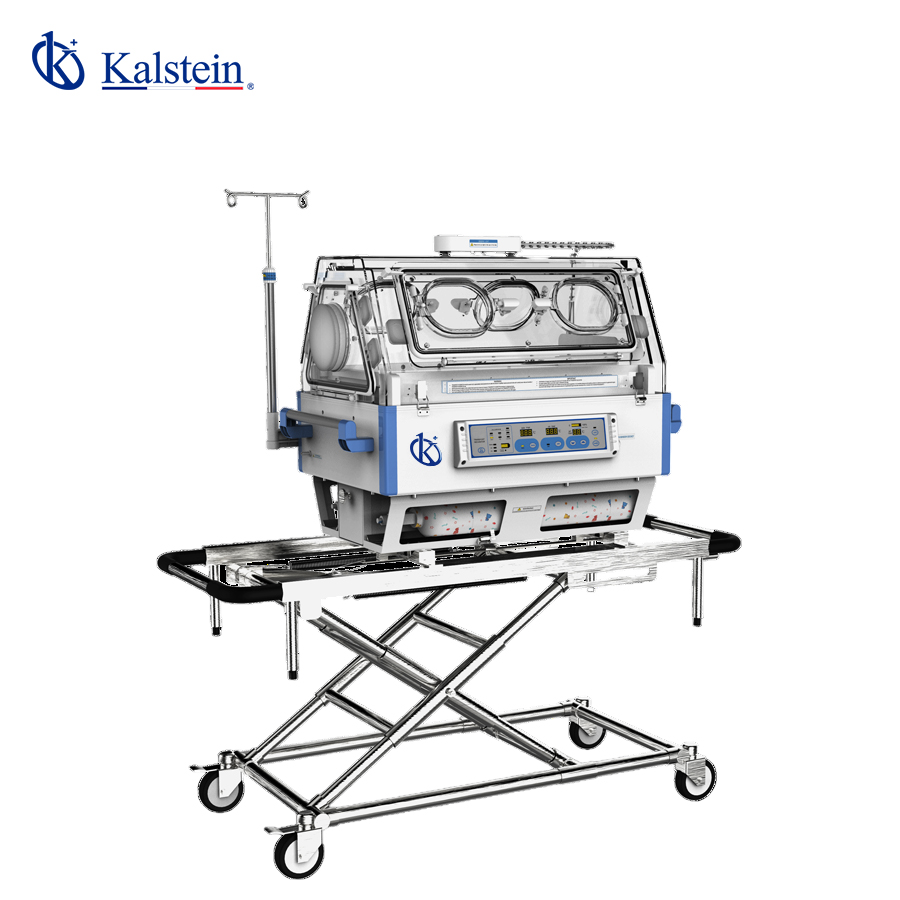
Installation and Setup Guide for the YR06215 Infant Incubator
The YR06215 Infant Incubator is a vital piece of equipment designed to provide optimal care for premature and ill infants. This guide will focus on the installation and initial setup of the YR06215, ensuring that operators can efficiently and accurately prepare the device for use in clinical settings.
Unboxing and Initial Inspection
Upon receiving the YR06215 Infant Incubator, it is essential to carry out an unboxing checklist to verify that all components are intact and functioning. The following items should be included:
- YR06215 Infant Incubator unit
- Oxygen bottles and flow meter
- Instruction manual
- Power cord
- Various accessories
Ensure to inspect the incubator for any visible damage during shipping. If any issues are found, contact support immediately.
Site Requirements and Preparation
Before powering on the YR06215, it is crucial to prepare the site to meet the operational standards required for optimal performance. Key environmental requirements include:
| Parameter | Requirement |
|---|---|
| Ambient Temperature | 10°C~30°C |
| Relative Humidity | 30%~75% |
| Airflow Velocity | Less than 1m/s |
| Power Supply | AC110/220V 60/50Hz |
| Required Clearance | Ensure adequate space around the unit for ventilation and maintenance. |
Anchoring and Leveling the Unit
Position the YR06215 on a stable, level surface. Use a leveling tool to ensure that the incubator is perfectly horizontal. If necessary, adjust the feet of the unit to achieve proper leveling. This is critical to ensure accurate temperature readings and consistent performance.
Powering Up and Initial Calibration
Once the unit is leveled and positioned correctly, plug it into the power supply. Follow these steps to power up the YR06215:
- Press the power button located on the control panel.
- Check for any error codes on the display screen.
- Calibrate the incubator by setting the desired air and skin temperature ranges. Refer to the user manual for the appropriate calibration steps.
First-run calibration is crucial for ensuring that the incubator's sensors function correctly. Test the temperature controls and make adjustments as needed based on the displayed values.
Operational Features and Controls
The YR06215 is equipped with several operational features that enhance its usability:
- Six operating windows for visibility and access.
- Two adjustable side access windows for easy handling of the infant.
- Dual-layer wall design for improved insulation.
- White LED lighting for optimal visibility.
Operators should familiarize themselves with these features to ensure efficient use of the incubator.
Common Setup Mistakes to Avoid
While setting up the YR06215, operators may encounter common pitfalls. Here are mistakes to avoid:
- Not adhering to site preparation requirements, leading to improper function.
- Failing to ensure proper calibration before use.
- Neglecting to check for error codes upon powering up.
By avoiding these mistakes, operators can ensure a smooth setup process for the YR06215.
Technical Specifications of YR06215
The following table outlines key technical specifications of the YR06215 Infant Incubator:
| Specification | Value |
|---|---|
| Model | YR06215 |
| Power Supply | AC110/220V 60/50Hz |
| Power Input | 450VA |
| Air Temperature Control Range | 25°C-37°C, 37.1°C-38°C |
| Skin Temperature Control Range | 32°C-37°C, 37.1°C-38°C |
| Warm-Up Time | Less than 40 minutes |
| Internal Noise Level | Less than 60dB(A) |
| Main Battery | DC12V 40AH, Li-ion Battery |
Frequently Asked Questions
What should I do if the YR06215 does not power on?
If the YR06215 does not power on, first check the power supply connection. Ensure that the power cable is securely plugged into both the incubator and the outlet. If the connection is secure and the incubator still does not respond, check for any internal error codes displayed on the control panel, and refer to the troubleshooting section of the manual.
How do I calibrate the temperature settings on the YR06215?
Calibration involves setting the desired air and skin temperature ranges through the control panel. Follow the instructions in the user manual to adjust these settings accurately. It's crucial to perform calibration before the first use to ensure accurate monitoring of temperature.
What are the environmental conditions required for the YR06215?
The YR06215 requires ambient temperatures between 10°C and 30°C and relative humidity of 30% to 75% for optimal operation. Ensure that the unit is placed in a suitable location that meets these environmental requirements.
How often should I perform maintenance on the YR06215?
Regular maintenance should be performed according to the manufacturer's recommendations. This includes cleaning the air filter and checking the battery status. Regular maintenance keeps the incubator functioning optimally and prolongs its lifespan.
What safety features are included in the YR06215?
The YR06215 is equipped with a second thermal disconnection function for enhanced safety, allowing for automatic shutdown in case of overheating. Additionally, it features alarms for temperature deviation to alert operators of any issues.
Can the YR06215 be used for multiple infants at once?
No, the YR06215 is designed for individual infant care. Using it for multiple infants simultaneously could compromise the safety and effectiveness of the incubator.
How can I request a quote for the YR06215?
If you are interested in obtaining a quote for the YR06215, please contact us through our inquiry channels. We are here to assist you with pricing and any additional information you may need.
If you are looking for a fusion of innovation and quality, you have come to the right place. At Kalstein, we offer you the luxury of exploring our exclusive catalog of laboratory equipment. We manufacture every device to the highest standards of excellence. Our intuitive and seamless online purchasing channels are designed for your convenience, securing the most competitive prices. Hesitate no longer — we bring science to life, it is time to become part of our community.