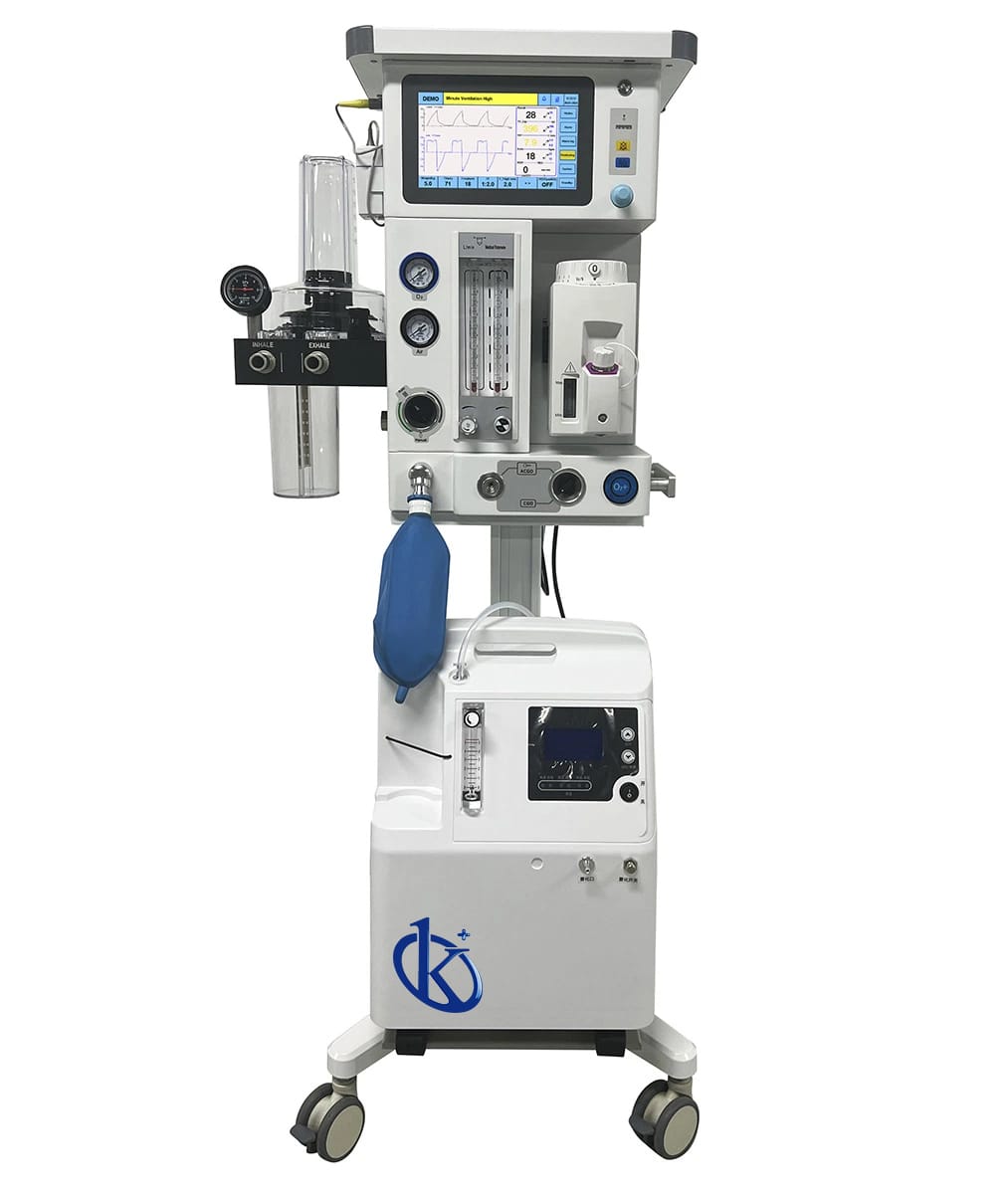
Installation and Commissioning Guide for the Turbo-driven Veterinary Anesthesia Machine YR06101
The Turbo-driven Veterinary Anesthesia Machine YR06101 is a sophisticated device designed to provide precise anesthesia delivery during veterinary procedures. Ensuring proper installation and commissioning is critical to achieving optimal performance. This guide will walk you through the essential steps required for setting up the YR06101 effectively.
Unboxing and Initial Checklist
Before installing the YR06101, it is vital to carefully unbox the unit and verify that all components are present. Here’s a checklist of items to look for:
- Turbo-driven anesthesia machine unit
- High-quality aluminum trolley
- Oxygen flowmeter and tubing
- CO2 absorber
- User manual and installation guides
- Power cable
- Spare components (if applicable)
Site Requirements and Preparation
Before proceeding with installation, ensure that the site meets the following requirements:
- Temperature Range: The machine should operate within 15°C to 30°C.
- Humidity: Relative humidity should not exceed 80%.
- Power Supply: Ensure a stable power supply of 110-240V.
- Ventilation: Adequate ventilation is needed to dissipate heat from the unit.
- Space Clearance: Maintain a clearance of at least 30 cm around the machine.
Anchoring and Leveling the Unit
Once the site is prepared, follow these steps to anchor and level the YR06101:
- Place the anesthesia machine on a flat, stable surface.
- Use a leveling tool to ensure the unit is perfectly horizontal.
- Secure the trolley in place to avoid any movement during operation.
Power-Up Sequence and Calibration
To power up the YR06101 and ensure that it is properly calibrated, follow these steps:
- Connect the power cable to an appropriate power outlet.
- Press the power button to turn on the unit.
- Allow the machine to perform its initial self-diagnostic check.
- Calibrate the flowmeter according to the manufacturer's specifications.
- Set the animal's weight, and the machine will automatically calculate other parameters.
Operating Modes of the YR06101
The YR06101 offers various operating modes tailored to different situations:
- SPONT (V/S, Apnea): This mode prevents respiratory confrontations and is suitable during recovery or light anesthesia.
- MANUAL: In this mode, the machine monitors respiratory status without providing assistance. It is ideal for controlled environments.
Common Setup Mistakes and Troubleshooting
Awareness of common installation mistakes can save time and prevent operational issues:
- Incorrect Leveling: Ensure the unit is leveled; otherwise, readings may be inaccurate.
- Poor Ventilation: Ensure adequate ventilation to prevent overheating.
- Improper Calibration: Follow the calibration instructions carefully to avoid misdiagnosis.
Troubleshooting Table
| Symptom | Possible Cause | Solution |
|---|---|---|
| Machine does not power on | Power supply issue | Check power connections and outlet. |
| Inaccurate readings | Improper calibration | Recalibrate the flowmeter and settings. |
| Unresponsive during operation | Software glitch | Restart the machine and check for updates. |
Technical Specifications of the YR06101
| Model | YR06101 |
|---|---|
| Main Unit | High quality aluminum trolley |
| Application Range | Animal weight 0.8-120kg |
| CO2 Absorber | Integrated design of animal-specific integrated bellows |
| Flowmeter | Animal-specific oxygen tube, Flow: 0~1 & 1-10L/min |
| Ventilator Drive Mode | Turbine and electronic control |
Frequently Asked Questions
What is the ideal setup for the YR06101 anesthesia machine?
The ideal setup requires a stable, level surface with adequate ventilation and proper electrical connections to ensure safety and accuracy during operation.
How do I maintain the YR06101 anesthesia machine?
Regular maintenance involves checking the calibration, inspecting the flowmeter, and ensuring the CO2 absorber is replaced periodically as per the manufacturer's recommendations.
What types of animals can be treated with the YR06101?
The YR06101 is suitable for a wide range of animals, specifically those weighing between 0.8 to 120 kg, making it versatile for various veterinary applications.
Can the YR06101 be used for both light and deep anesthesia?
Yes, the YR06101 can efficiently manage both light and deep anesthesia, adapting its delivery based on the selected operating mode and the animal's condition.
What are the common troubleshooting steps for the YR06101?
Common troubleshooting steps include checking power connections, recalibrating settings, and ensuring adequate ventilation to avoid overheating or erratic behavior.
How can I request a quote for the YR06101?
You can request a quote for the YR06101 through the appropriate channels provided by our sales team. They will assist you with pricing and availability.
If you are looking for a fusion of innovation and quality, you have come to the right place. At Kalstein, we offer you the luxury of exploring our exclusive catalog of laboratory equipment. We manufacture every device to the highest standards of excellence. Our intuitive and seamless online purchasing channels are designed for your convenience, securing the most competitive prices. Hesitate no longer — we bring science to life, it is time to become part of our community.