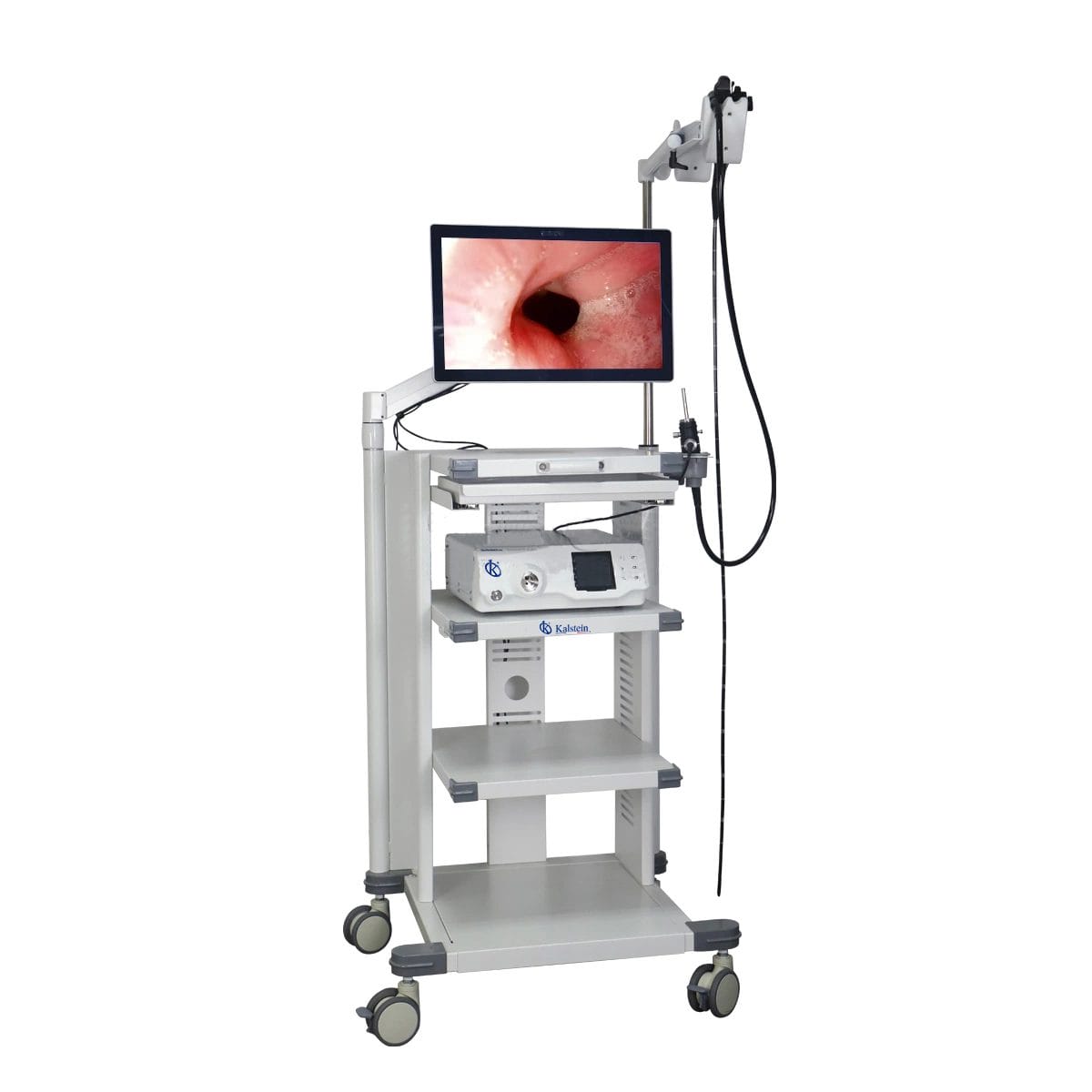
Installation and Commissioning Guide for the YR06146 High Definition Veterinary Video Endoscope
The YR06146 High Definition Veterinary Video Endoscope is designed to perform a variety of endoscopic procedures in both small and large animals. This guide aims to provide detailed instructions for the installation and commissioning of the YR06146, ensuring users achieve optimal functionality and performance.
Overview of the YR06146 Veterinary Endoscope
The YR06146 is not just a tool; it represents a paradigm shift in veterinary diagnostics. With applications ranging from gastroscopy to bronchoscopy in companion animals like dogs and cats, as well as in larger species such as horses and cattle, this endoscope brings advanced imaging capabilities to the forefront of veterinary medicine. Its features include high-resolution imaging, a professional imaging workstation, and an ergonomic design, all tailored to enhance user experience and diagnostic accuracy.
Technical Specifications of the YR06146
| Model | Diameter of Insertion Tube | Working Channel | Working Length | View Angle | View Depth | Range of Bending | Resolution |
|---|---|---|---|---|---|---|---|
| YR06146 | 7.8 mm | 2.8 mm | 1500 mm | 120° | 3~100 mm | 180° (Up), 130° (Down), 100° (Right), 100° (Left) | HD 720P (1M pixels) |
Unboxing Checklist for the YR06146
Before installation, it is essential to ensure that all components are accounted for. The following checklist provides a comprehensive overview of what should be included in the package:
- YR06146 Endoscope Unit
- Image Processing Workstation
- Power Supply Unit
- Endoscope Cleaning and Maintenance Kit
- User Manual
- Warranty Registration Card
Installation Steps for the YR06146
Follow these steps to successfully install and set up the YR06146:
- Location Selection: Choose a clean, dry, and well-ventilated area for installation, ensuring proximity to power outlets and drainage systems.
- Workstation Setup: Position the image processing workstation on a stable surface, ensuring it is level and secure.
- Power Connections: Connect the power supply unit to the workstation and plug it into a compatible outlet.
- Endoscope Connection: Attach the endoscope to the workstation via the designated input ports. Secure all connections to prevent disconnections during use.
- Initial Power-Up: Turn on the workstation and follow the on-screen prompts to initialize the system.
- Calibration: Perform the first-run calibration as outlined in the user manual, ensuring all settings are optimized for performance.
Common Setup Mistakes to Avoid
To ensure a seamless installation experience, be mindful of these common pitfalls:
- Forgetting to check the power supply compatibility before connecting.
- Neglecting to secure the endoscope connections, which can lead to system malfunctions.
- Ignoring the calibration step, which is crucial for accurate diagnostics.
Validating First Measurements
Once the installation is complete, validating the first measurements is essential. This involves:
- Testing the endoscope in a controlled environment with known parameters.
- Comparing the visual output with standard benchmarks to ensure accuracy.
- Documenting the results for future reference and quality assurance.
Frequently Asked Questions
What types of procedures can the YR06146 perform?
The YR06146 is designed for a variety of endoscopic procedures including gastroscopy, colonoscopy, bronchoscopy, esophagoscopy, hysteroscopy, rhinoscopy, pharyngoscopy, and laryngoscopy across various animal species.
What is the optimal operating environment for the YR06146?
The optimal environment includes a temperature range of 15-30 degrees Celsius, humidity levels between 30-70%, and a stable power supply within specified voltage and frequency parameters.
How do I maintain the YR06146 for optimal performance?
Regular maintenance involves cleaning the endoscope after each use, checking for any physical damage, and ensuring the software is updated according to the manufacturer’s guidelines.
What should I do if the YR06146 does not power on?
If the device does not power on, verify that the power supply is properly connected, check the outlet for functionality, and inspect the power cable for any visible damage.
Can I request a quote for the YR06146?
Yes, you can request a quote for the YR06146 by contacting our sales team or visiting our online platform for a tailored quote based on your needs.
What kind of warranty comes with the YR06146?
The YR06146 typically comes with a standard warranty that covers manufacturing defects and provides options for extended coverage depending on usage and service plans.
Conclusion
The YR06146 High Definition Veterinary Video Endoscope is a vital tool in modern veterinary practice, offering extensive capabilities for diagnostic procedures in animals. By following this installation and commissioning guide, users can ensure effective and reliable operation from the outset.
If you are looking for a fusion of innovation and quality, you have come to the right place. At Kalstein, we offer you the luxury of exploring our exclusive catalog of laboratory equipment. We manufacture every device to the highest standards of excellence. Our intuitive and seamless online purchasing channels are designed for your convenience, securing the most competitive prices. Hesitate no longer — we bring science to life, it is time to become part of our community.