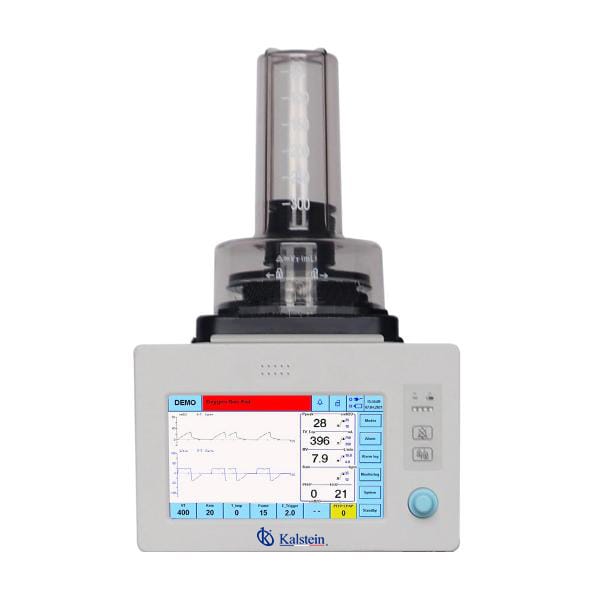
Installation and Commissioning Guide for the YR06103 Veterinary Anesthesia Ventilator
The YR06103 Veterinary Anesthesia Ventilator is designed for seamless integration into veterinary practices, offering advanced features such as automatic parameter calculation and user-friendly controls. This guide focuses on the essential steps for installing and commissioning the YR06103, ensuring that operators can maximize its potential from the outset.
Unboxing and Initial Setup
Upon receiving the YR06103, unbox the equipment carefully to avoid damage. Ensure that all included components are present, as per the following checklist:
- YR06103 Ventilator unit
- Power cord
- User manual
- Calibration tools
- Accessory bag (hoses, connectors)
After unboxing, inspect the unit for any damages and ensure that all components are accounted for before proceeding with installation.
Anchoring and Leveling
For optimal operation, the YR06103 should be placed on a stable, flat surface. Anchoring may be necessary if the ventilator is used in a moving environment. Level the unit using a spirit level to ensure accurate measurements during operation.
Power-Up Sequence
Connect the ventilator to a suitable power supply, ensuring it meets the specifications outlined in the user manual. Follow these steps for the power-up process:
- Connect the power cord to the YR06103.
- Plug the other end into a grounded electrical outlet.
- Switch on the power button located on the device.
Observe the display for any error messages during the initial power-up. Ensure that the system is functioning correctly before proceeding to calibration.
First-Run Calibration
Calibration is vital to ensure accurate readings. Follow the instructions in the user manual for the calibration process. Typically, this will include the following:
- Setting the tidal volume and respiratory rate according to the manufacturer's guidelines.
- Using calibration tools to adjust the ventilator settings.
- Checking all connections for leaks.
Perform a test run with a simulated load before using the ventilator on patients. This ensures that all settings are correct and that the unit is functioning as intended.
Common Setup Mistakes
Here are some common errors to avoid during installation and commissioning:
- Failing to secure all connectors properly, leading to leaks.
- Improperly calibrating the device, which can result in inaccurate readings.
- Neglecting to check power source compatibility.
By keeping these points in mind, operators can ensure a smooth installation process.
Technical Data Table for the YR06103
| Specification | Details |
|---|---|
| Model | YR06103 |
| Display | 9-inch TFT touch screen |
| Gas type | O2 or Air |
| Inlet pressure | 280-600 kPa |
| Max flow | <= 120 L/min |
| Operating Mode | VCV, PCV, SPONT, Manual, Demo |
| Battery Type | Li-ion, work time more than 2 hours |
| Weight | 12 kg |
Frequently Asked Questions
How can I ensure the YR06103 Ventilator is properly calibrated before use?
Calibration should be performed according to the guidelines provided in the user manual. Regularly check settings against known standards and perform test runs to verify accuracy.
What should I do if the YR06103 does not power on?
Check the power connections and ensure that the unit is plugged into a functioning outlet. If the issue persists, consult the troubleshooting section of the user manual for further diagnostics.
How can I check for leaks in the YR06103 connections?
During the initial setup, apply a leak detection solution to all connections while the unit is operating. Bubbles will form at leak points, indicating where adjustments are needed.
What safety features are included with the YR06103 Ventilator?
The YR06103 includes safety features such as pressure monitoring and alarms for low battery and system errors, ensuring the safety of both patients and operators.
Can the YR06103 be used with different anesthesia machines?
Yes, the YR06103 is compatible with various models of veterinary anesthesia machines, making it versatile for different veterinary practices.
How often should the YR06103 be serviced?
Regular servicing is recommended every six months to maintain optimal performance and safety. Refer to the user manual for specific maintenance guidelines.
Where can I request a quote for the YR06103?
For detailed pricing and options, please contact us directly to request a quote tailored to your needs.
If you are looking for a fusion of innovation and quality, you have come to the right place. At Kalstein, we offer you the luxury of exploring our exclusive catalog of laboratory equipment. We manufacture every device to the highest standards of excellence. Our intuitive and seamless online purchasing channels are designed for your convenience, securing the most competitive prices. Hesitate no longer — we bring science to life, it is time to become part of our community.