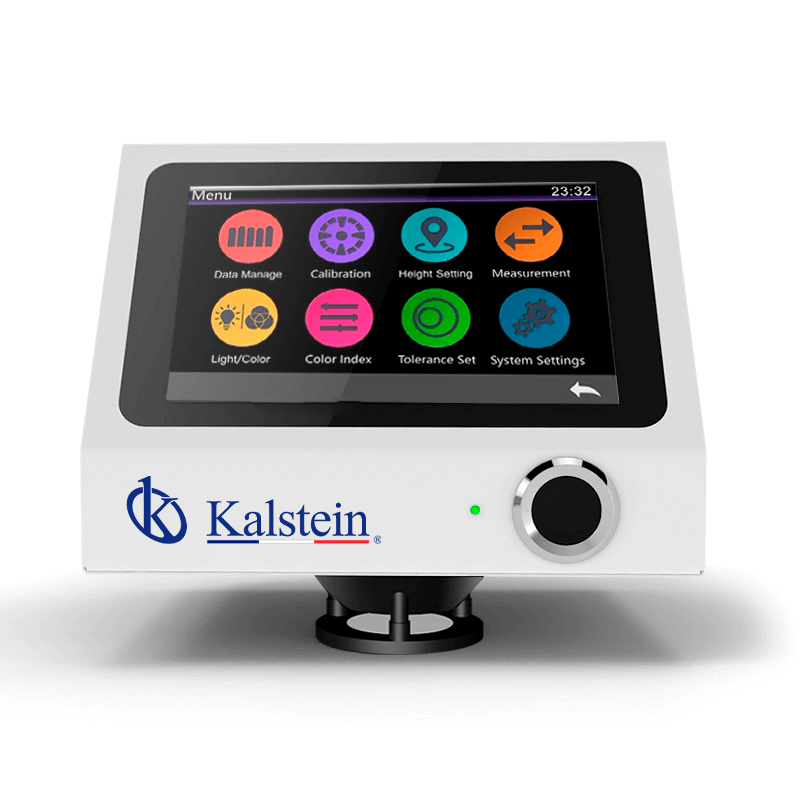
Installation and Commissioning Guide for the YR05480 Contactless Desktop Spectrophotometer
The YR05480 Contactless Desktop Spectrophotometer is a cutting-edge device designed for precise color measurement across a variety of applications. This guide aims to provide a thorough understanding of the installation and commissioning processes to ensure that the spectrophotometer operates at peak efficiency from day one.
Unboxing Checklist
Before getting started with the installation, it is crucial to check that all components are included in the packaging. The unboxing checklist for the YR05480 includes:
- YR05480 Spectrophotometer
- Power adapter
- Data cable
- Calibration standard plate
- User manual
- Calibration black box
Site Requirements
Setting up the YR05480 requires considering specific environmental conditions. The following site requirements should be met:
| Parameter | Requirement |
|---|---|
| Temperature Range | 0~40 °C |
| Humidity | 0~85% HR (non-condensing) |
| Altitude | Less than 2000 m |
| Power Supply | AC 24V, 3A |
Anchoring and Leveling
Once the site requirements are confirmed, the next step is to anchor and level the spectrophotometer. Ensure that the device is placed on a stable surface, secure enough to prevent vibrations that could interfere with measurements.
Utilize leveling tools to adjust the feet of the YR05480, ensuring that it is perfectly horizontal. This process is vital for achieving accurate readings during operation.
Power-Up Sequence
Follow these steps to power up the YR05480:
- Connect the power adapter to the device and plug it into a wall outlet.
- Ensure that the power button is switched on.
- Wait for the device to initialize. This may take a few moments.
Calibration Process
Calibration is essential for ensuring the accuracy of the YR05480. Follow these steps for calibration:
- Use the provided calibration black box and standard plate.
- Select the calibration option from the main menu on the touchscreen interface.
- Follow the on-screen instructions to complete the calibration.
It is recommended to perform a calibration check before the first run and periodically thereafter to maintain accuracy.
First-Run Validation
After calibration, it is essential to validate the first measurement:
- Select a known sample for testing.
- Run the measurement and review the readings.
- Compare the results against expected values to ensure accuracy.
Common Setup Mistakes
During the installation and commissioning of the YR05480, operators may encounter some common setup mistakes, including:
- Improper leveling leading to skewed measurements.
- Failure to calibrate the spectrophotometer before the first measurements.
- Incorrect power supply connections.
By being aware of these potential pitfalls and following the guide closely, users can mitigate these risks and ensure successful installation.
Technical Specifications of the YR05480
| Model | YR05480 |
|---|---|
| Optical Geometry | D/8 (diffuse illumination, 8° reception); conforms to CIE No.15, GB/T 3978, ISO7724-1 standards. |
| Light Source | Full-spectrum LED, UV light source |
| Measurement Method | Concave grating |
| Weight | Approximately 3 kg |
| Dimensions | 200 x 200 x 160 mm |
| Color Space | CIE Lab, XYZ, s-RGB, HunterLab, etc. |
Frequently asked questions
What are the main features of the YR05480 spectrophotometer?
The YR05480 features a contactless measurement method, a full-spectrum LED light source, and a dual 256-pixel CMOS image sensor, ensuring high accuracy and efficiency in color measurement.
How do I perform regular maintenance on the YR05480?
Regular maintenance includes cleaning the measurement area, recalibrating the device every few months, and checking for software updates to ensure optimal performance.
Can the YR05480 be used for different applications?
Yes, the YR05480 is versatile and can be utilized in various sectors such as clinical laboratories, food production, and industrial quality control.
What should I do if the YR05480 does not power on?
If the device does not power on, check the power connections, ensure the outlet is functional, and verify that the power button is activated. If issues persist, consult the user manual for troubleshooting steps.
How often should I calibrate the YR05480?
Calibration should be performed before the first use and regularly thereafter, typically every few weeks, or whenever a significant change in environmental conditions occurs.
What are the dimensions of the YR05480?
The dimensions of the YR05480 are 200 mm x 200 mm x 160 mm, making it compact and suitable for desktop use.
Where can I request a quote for the YR05480?
You can request a quote for the YR05480 through our inquiry channels. Our team will assist you promptly.
If you are looking for a fusion of innovation and quality, you have come to the right place. At Kalstein, we offer you the luxury of exploring our exclusive catalog of laboratory equipment. We manufacture every device to the highest standards of excellence. Our intuitive and seamless online purchasing channels are designed for your convenience, securing the most competitive prices. Hesitate no longer — we bring science to life, it is time to become part of our community.