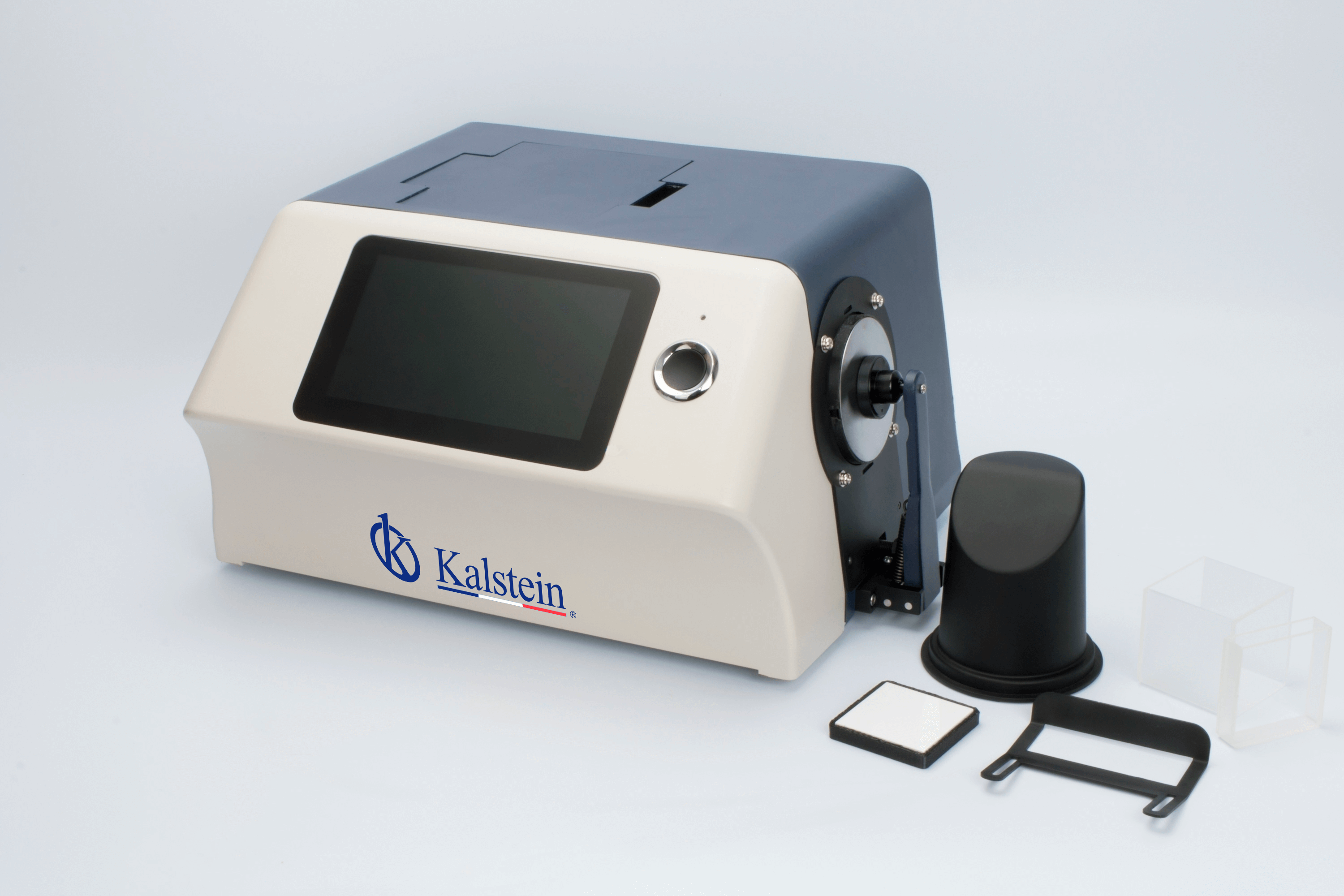
Installation and Commissioning Guide for the YR05478 Benchtop Spectrophotometer
The YR05478 Benchtop Spectrophotometer is a sophisticated instrument designed for precise color measurement and analysis across various industries. Installing and commissioning this device correctly is crucial for achieving accurate results and extending its lifespan. This guide provides detailed steps for unboxing, setting up, calibrating, and performing the first measurements with the YR05478.
Unboxing and Initial Setup
Before powering up your YR05478, ensure you have everything required for setup. Unboxing should be performed carefully to avoid any damage to the instrument.
- Check the contents against the included checklist: YR05478 unit, power adapter, user manual, calibration plate, USB cable, sample holder, and standard accessories.
- Inspect the device for any visible damages that may have occurred during shipping.
Ensure you have a suitable workstation for the device, considering ventilation and accessibility for maintenance.
Site Requirements and Environmental Conditions
Proper environmental conditions are paramount for the optimal performance of the YR05478. Below is a checklist of the recommended site requirements:
| Condition | Requirements |
|---|---|
| Temperature | 0~40℃ |
| Humidity | 0~85% RH (non-condensing) |
| Altitude | Less than 2000m |
| Clearance | Maintain at least 30cm on all sides for airflow. |
Power-Up Sequence
Once the site conditions are met and the device is correctly positioned, follow these steps to power up:
- Connect the power adapter to the YR05478 and plug it into a power outlet.
- Press the power button to turn on the device.
- Wait for the initialization process to complete; the display will guide you through this phase.
Calibration for Accurate Measurements
Calibration is essential for ensuring the accuracy of the YR05478. Follow these steps:
- Use the provided calibration plate and place it correctly on the sample holder.
- Access the calibration menu through the touchscreen interface.
- Follow the on-screen instructions to complete the calibration process.
Regular calibration helps maintain measurement accuracy and is recommended after every 100 uses or when changing sample types.
First Measurement Validation
To validate the setup and calibration, perform a test measurement:
- Select a known standard sample for measurement.
- Place the sample in the holder and follow on-screen prompts to conduct the measurement.
- Compare the results with expected values to ensure the device is functioning correctly.
If discrepancies occur, revisit the calibration steps or consult troubleshooting resources.
Troubleshooting Common Setup Issues
While setting up the YR05478, you may encounter some common issues:
| Symptom | Probable Cause | Solution |
|---|---|---|
| Device does not power on | Faulty power connection | Check the power adapter and connections. |
| Calibration fails | Incorrect sample placement | Ensure proper placement of the calibration plate. |
| Inconsistent readings | Environmental factors | Check for temperature and humidity stability. |
Technical Specifications of the YR05478
| Specification | Detail |
|---|---|
| Model | YR05478 |
| Weight | Approx. 9.6 kg |
| Dimensions | 370 x 300 x 200 mm |
| Power Supply | AC 24V, 3A Adapter |
| Wavelength Range | 360-780nm |
| Data Storage Capacity | 20000 samples |
Frequently Asked Questions
How do I properly install the YR05478 spectrophotometer?
Installation involves unboxing the device, ensuring environmental conditions are met, connecting the power supply, and performing the initial calibration.
What are the environmental conditions required for the YR05478?
The YR05478 requires a temperature range of 0-40℃ and humidity of 0-85% RH. Always ensure good ventilation and maintain a clear space around the device.
How often should I calibrate the YR05478?
It is recommended to calibrate the YR05478 after every 100 uses or when changing sample types to ensure measurement accuracy.
What should I do if the YR05478 doesn't power on?
Check all power connections and ensure the device is plugged into a working outlet. If the problem persists, consult the user manual for additional troubleshooting steps.
Can I perform measurements immediately after installation?
It is essential to calibrate the spectrophotometer after installation before performing measurements to ensure accurate results.
What is the maximum data storage capacity of the YR05478?
The YR05478 can store up to 20,000 samples, allowing for extensive data analysis without immediate data transfer.
Where can I find support for issues related to the YR05478?
Support can typically be found through the manufacturer’s customer service, user manuals, or dedicated support forums for technical assistance.
If you are looking for a fusion of innovation and quality, you have come to the right place. At Kalstein, we offer you the luxury of exploring our exclusive catalog of laboratory equipment. We manufacture every device to the highest standards of excellence. Our intuitive and seamless online purchasing channels are designed for your convenience, securing the most competitive prices. Hesitate no longer — we bring science to life, it is time to become part of our community.