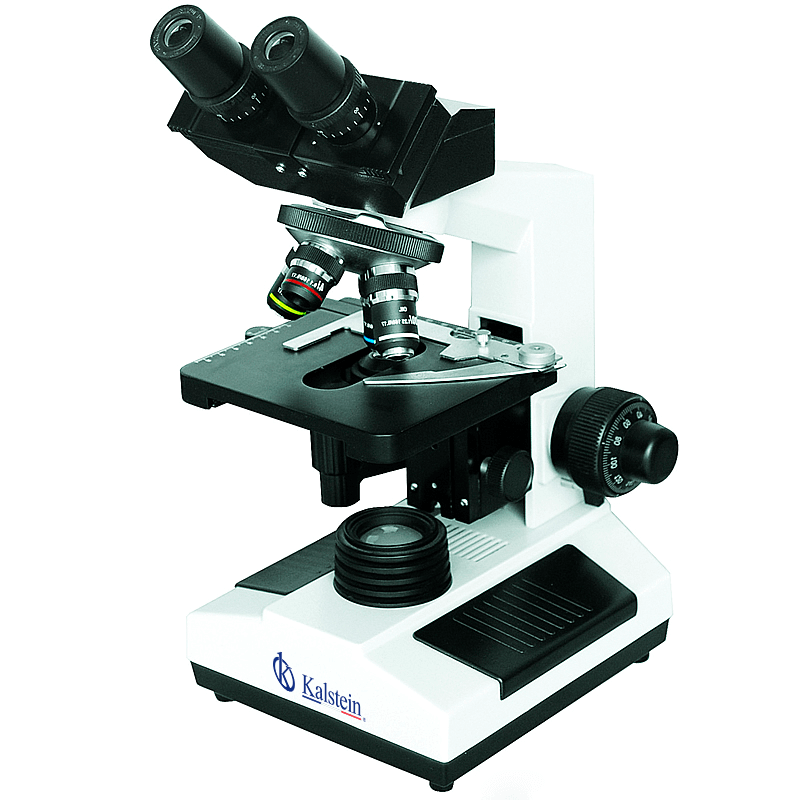
Installation and Commissioning Guide for the YR0242-1 Binocular Student Biological Microscope
The YR0242-1 Binocular Student Biological Microscope is an essential tool for educational laboratories, providing high-quality magnification and features tailored for students. This guide aims to facilitate a seamless installation and commissioning process, ensuring users can quickly familiarize themselves with the equipment.
Unboxing Checklist
Before proceeding with the installation, ensure that all components are included in the package. The unboxing checklist for the YR0242-1 includes:
- YR0242-1 Microscope Body
- Widefield Eyepiece WF10x/18 mm
- Acromatic Objectives: 4x, 10x, 40x, 100x
- Condenser NA1.25 Abbe
- Mechanical Stage
- Power Adapter
- User Manual
- Optional Accessories (if applicable)
Preparing for Setup
Before setting up the YR0242-1, it is crucial to choose an appropriate location. The ideal environment should be:
- Stable and flat surface to avoid vibrations
- Well-lit area to facilitate adjustments
- Free from dust and contaminants
Assembly Instructions
Follow these steps to assemble the YR0242-1 microscope:
- Attach the eyepiece securely into the eyepiece tube.
- Install the objective lenses by rotating them into the revolving nosepiece.
- Connect the mechanical stage onto the main body of the microscope.
- Attach the condenser and ensure it is aligned correctly with the light source.
- Plug in the power adapter to the microscope and connect to a power source.
Leveling the Microscope
To ensure accurate observations, the microscope must be leveled. Here's how to do it:
- Place a spirit level on the stage of the microscope.
- Adjust the leveling feet accordingly until the bubble is centered.
Proper leveling ensures that the optical components are aligned for optimal performance.
Power-Up Sequence
Before your first use, follow these power-up steps:
- Ensure that all components are securely attached.
- Connect the power adapter to a suitable outlet.
- Switch on the microscope using the power button.
- Allow the light source to warm up for a few minutes.
Calibration and Initial Setup
Calibrating the microscope ensures accurate measurements:
- Select the lowest objective lens (4x) to start.
- Place a calibration slide on the mechanical stage.
- Adjust the focus using the coarse and fine knobs until the slide is clear.
- Switch to higher objectives and repeat the focusing process.
Calibration should be repeated periodically to maintain accuracy.
Troubleshooting Common Setup Issues
Here are common issues encountered during setup, along with solutions:
| Issue | Possible Cause | Solution |
|---|---|---|
| Microscope does not power on | Power adapter not connected | Check connections and ensure the outlet is working |
| No illumination | Light bulb burned out | Replace with a new bulb (6V20W Halogen) |
| Blurry images | Incorrect focusing | Re-adjust focus knobs |
| Stage does not move | Stage lock engaged | Release the stage lock |
Technical Specifications of YR0242-1
| Specification | Description |
|---|---|
| Model | YR0242-1 |
| Magnification | 40x ~ 1000x |
| Head Type | Binocular head inclined at 45° |
| Eyepiece | WF10x/18mm Widefield |
| Objectives | Acromatic 4x, 10x, 40x, 100x (oil) |
| Stage | Double-layer mechanical stage, 140 x 140 mm |
| Condenser | NA1.25 Abbe condenser with iris diaphragm |
| Light Source | Built-in 6V20W halogen lamp |
Frequently Asked Questions
What are the main features of the YR0242-1 microscope?
The YR0242-1 microscope features a binocular head, widefield eyepieces, acromatic objectives ranging from 4x to 100x, and a double-layer mechanical stage for ease of use. Additionally, it includes a built-in halogen light source for illumination.
How do I clean the YR0242-1 microscope?
To clean the YR0242-1 microscope, use a soft lint-free cloth and gentle lens cleaner for optical surfaces. Avoid using harsh chemicals or abrasive materials that could damage the lenses or paint.
Can the YR0242-1 be used for professional purposes?
While the YR0242-1 is designed primarily for educational use, its high-quality optics and durable construction make it suitable for light professional applications. However, for advanced professional work, consider higher-grade models.
What optional accessories are available for the YR0242-1?
Optional accessories include trinocular heads, different objective lenses, and an extended mechanical stage for enhanced functionality. These accessories can enhance the microscope's versatility for various applications.
How often should I calibrate the YR0242-1 microscope?
Calibration of the YR0242-1 microscope should be performed regularly, ideally before each use or at least once a month, to ensure accurate measurements and optimal performance.
If you are looking for a fusion of innovation and quality, you have come to the right place. At Kalstein, we offer you the luxury of exploring our exclusive catalog of laboratory equipment. We manufacture every device to the highest standards of excellence. Our intuitive and seamless online purchasing channels are designed for your convenience, securing the most competitive prices. Hesitate no longer — we bring science to life, it is time to become part of our community.