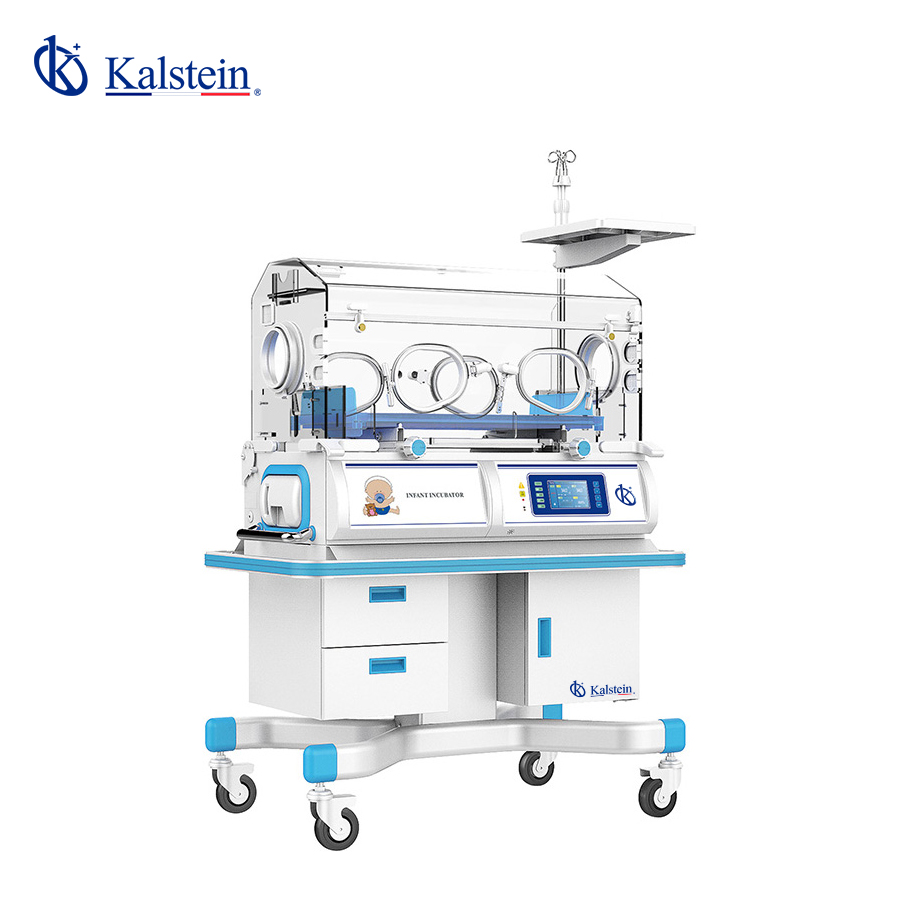
Installation and Commissioning Guide for the YR02187 Infant Incubator
The YR02187 Infant Incubator is a sophisticated device designed to provide a stable and controlled environment for newborns, particularly preterm or ill term infants. Understanding how to correctly install and commission the YR02187 is essential for optimal performance and safety. This guide details the step-by-step process to ensure that the YR02187 operates effectively from the moment it is unboxed.
Unboxing Checklist
Upon receiving the YR02187 Infant Incubator, it is crucial to perform an unboxing checklist to ensure all components are intact and ready for installation. Here’s what to look for:
- YR02187 Infant Incubator unit
- Power cable
- User manual
- Optional accessories (if purchased)
- Calibration tools (if required)
Installation Requirements
Before proceeding with the installation of the YR02187, ensure the following requirements are met:
- Power Supply: Ensure that the incubator is connected to a reliable power supply with the correct voltage and frequency.
- Environment: The incubator should be installed in a temperature-controlled room with minimal vibrations and disturbances.
- Space: Allow for proper clearance around the incubator for maintenance and access to ports.
Anchoring and Leveling
Once the location is determined, follow these steps to anchor and level the YR02187:
- Place the incubator on a stable, level surface.
- Use a bubble level to ensure the incubator is perfectly horizontal.
- Secure the unit to the surface if necessary to prevent tipping.
Power-Up Sequence
After installation, perform the following power-up sequence:
- Connect the power cable to the incubator and plug it into the wall outlet.
- Turn on the main power switch.
- Wait for the system to perform a self-check. The display should show the incubator's current status.
Initial Calibration and Setup
Calibration is vital to ensure accurate performance of the YR02187. Follow these steps for the initial setup:
- Access the temperature settings through the incubator's control panel.
- Set the desired air temperature and humidity levels according to the manual.
- Perform a test run to validate the settings — monitor the temperature and humidity for consistency.
Common Setup Mistakes
Awareness of common mistakes can prevent setbacks during installation:
- Neglecting to check the power supply voltage.
- Improper leveling, which can affect temperature readings.
- Failing to secure connections leading to power interruptions.
Technical Specifications Table for YR02187
| Specification | Details |
|---|---|
| Model | YR02187 |
| Temperature Control | Air and skin temperature control |
| Humidity Control | Measures humidity between 40% and 80% HR |
| Structure | Aluminum for stable temperature maintenance |
| Reclining Bed | Adjustable up to 10º |
| Airflow System | Natural air circulation |
| Power | Requires appropriate voltage supply |
| Dimensions | Dimensions not specified |
| Weight | Gross weight 120 kg |
Frequently Asked Questions
What is the optimal operating temperature range for the YR02187 Infant Incubator?
The optimal operating temperature for the YR02187 Infant Incubator typically ranges between 32°C to 37.5°C, depending on the specific needs of the infant being cared for.
How do I ensure proper humidity levels in the YR02187?
Monitoring and setting the humidity levels between 40% and 80% RH ensures a stable environment for the infant. Regular checks should be performed to maintain these levels, and adjustments can be made via the incubator's control panel.
What maintenance is required for the YR02187 Infant Incubator?
Regular cleaning of the incubator, including the water tank and surfaces, is essential. Additionally, routine checks of the temperature and humidity sensors should be performed to ensure their accuracy.
Can the YR02187 be used for infants with specific health conditions?
Yes, the YR02187 is designed to accommodate infants with various health challenges, including premature birth or specific medical conditions that require a controlled environment.
What should I do if the YR02187 displays an error code?
If an error code is displayed, refer to the user manual for troubleshooting steps. Common error codes may relate to temperature or humidity discrepancies and should be addressed immediately to ensure infant safety.
Is it necessary to calibrate the YR02187 regularly?
Yes, regular calibration of the YR02187 is necessary to ensure its accuracy in temperature and humidity control, which is critical for the health of the infant.
How can I request a quote for the YR02187?
You can request a quote for the YR02187 by contacting our sales team, who will provide detailed pricing and information tailored to your needs.
If you are looking for a fusion of innovation and quality, you have come to the right place. At Kalstein, we offer you the luxury of exploring our exclusive catalog of laboratory equipment. We manufacture every device to the highest standards of excellence. Our intuitive and seamless online purchasing channels are designed for your convenience, securing the most competitive prices. Hesitate no longer — we bring science to life, it is time to become part of our community.