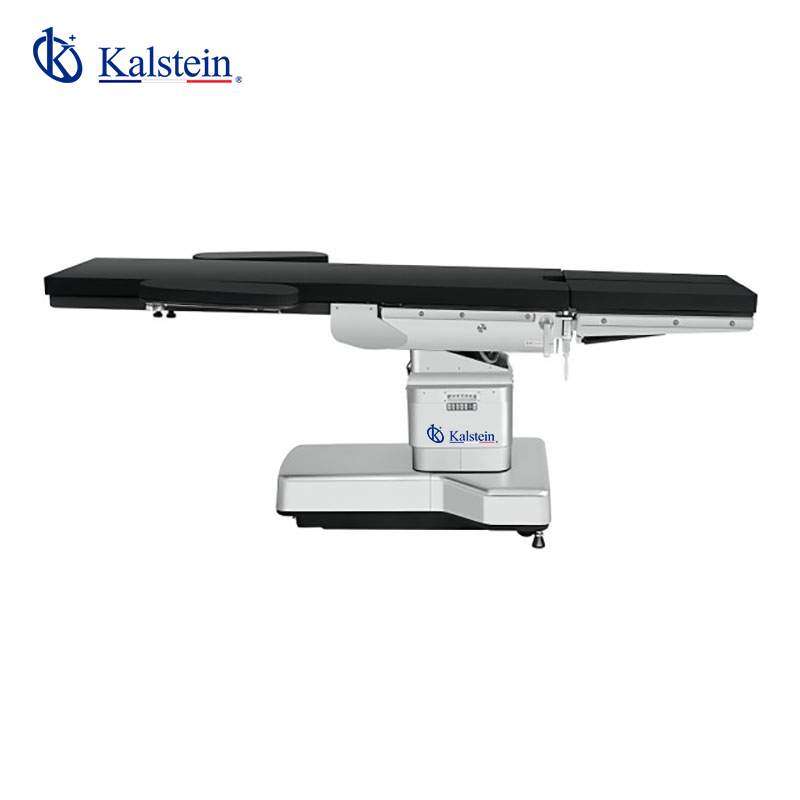
Installation and Commissioning Guide for the Electrohydraulic Operating Table YR06236
The YR06236 Electrohydraulic Operating Table is designed for versatility in surgical settings, featuring a carbon fiber tabletop, advanced hydraulic systems, and user-friendly controls. This guide will walk you through the essential steps for proper installation and commissioning to ensure optimal performance.
Unboxing and Initial Assessment
When you receive the YR06236, start by unboxing it carefully to prevent any damage. Ensure that all components are included as per the shipping checklist:
- Electrohydraulic Operating Table YR06236
- Remote control unit
- Power supply cables
- User manual and warranty information
Inspect the table for any visible damages. If anything seems amiss, contact your supplier immediately.
Site Preparation Checklist
Before installation, ensure that the site meets the required specifications for the YR06236. Here’s a checklist to follow:
| Requirement | Specification |
|---|---|
| Electrical Power | 220V+22V, 50+1Hz |
| Space Dimensions | 130 x 77 x 104 cm for packaging |
| Weight Capacity | Up to standard surgical equipment load |
| Floor Stability | Level and sturdy floor to support 358 kg |
Leveling and Anchoring the Table
Once the site is prepared, move the YR06236 to its designated area. Level the table using the built-in leveling feet. This ensures accurate positioning during surgeries. Anchoring may not be required in all cases; however, consult the user manual for specific recommendations based on your surgical environment.
Connecting Power and Initial Setup
Connect the power supply to the table following the instructions in the manual. Ensure that the power cable is securely plugged into an appropriate outlet. During the initial power-up, observe the LED indicators on the control panel. They should light up, signaling that the system is operational.
Calibration and First-Run Procedures
Calibration of the YR06236 should be done during the first run. Follow these steps:
- Activate the remote control and ensure the table responds to the commands.
- Adjust the table to its minimum and maximum height to confirm smooth operation.
- Test the tilt functions and ensure that they engage properly at the specified angles (≥15° for left and right tilt).
- Review the control CPU functions, including the auto-lock feature, to ensure all settings are correct.
This calibration ensures the table operates efficiently and safely during surgical procedures.
Common Setup Mistakes to Avoid
Here are some pitfalls that operators often encounter during the setup of the YR06236:
- Neglecting to check the power supply specifications can lead to equipment malfunction.
- Improper leveling may cause inaccurate positions during surgeries.
- Failing to run the initial calibration may affect the table's operational accuracy.
Technical Specifications for the YR06236
Here are the detailed technical specifications for the Electrohydraulic Operating Table YR06236:
| Specification | Details |
|---|---|
| Model | YR06236 |
| Length | 2290±100mm |
| Width | 520±20mm |
| Height Adjustment | (750~1150)±30mm |
| Tilt (left/right) | ≥15°/≥15° |
| Trendelenburg/Rev-Trend | ≥20°/≥25° |
| Headboard Upwards | ≥45° |
| Headboard Downwards | ≥90° |
| Backboard Upwards | ≥70° |
| Backboard Downwards | ≥25° |
| Weight Capacity | 358 kg |
| Main Voltage AC | 220V+22V, 50+1Hz |
| Input Power VA | 500+10% |
Frequently Asked Questions
What is the maximum weight capacity of the YR06236 operating table?
The YR06236 operating table has a maximum weight capacity of 358 kg, making it suitable for a range of surgical procedures.
How do I troubleshoot if the YR06236 does not power on?
If the table does not power on, first check the power connections and ensure the outlet is functioning. If the issue persists, consult the user manual for further troubleshooting steps.
What maintenance does the YR06236 require?
The YR06236 requires regular inspections of the hydraulic system and electrical components to ensure it operates effectively. Refer to the maintenance schedule in the user manual.
Can the YR06236 be adjusted for different surgical positions?
Yes, the YR06236 can be adjusted for various surgical positions using its tilt and height adjustment features, enhancing the versatility of surgical procedures.
What should I do if I encounter an error code on the YR06236?
Refer to the troubleshooting section of the user manual to identify the error code and follow the recommended steps to resolve the issue.
Is there a warranty for the YR06236 operating table?
Yes, the YR06236 comes with a warranty as outlined in the user manual, covering specific components and offering service options for repairs.
How can I request a quote for the YR06236 operating table?
You can request a quote for the YR06236 operating table by contacting our sales team or visiting our inquiry page for more details.
If you are looking for a fusion of innovation and quality, you have come to the right place. At Kalstein, we offer you the luxury of exploring our exclusive catalog of laboratory equipment. We manufacture every device to the highest standards of excellence. Our intuitive and seamless online purchasing channels are designed for your convenience, securing the most competitive prices. Hesitate no longer — we bring science to life, it is time to become part of our community.