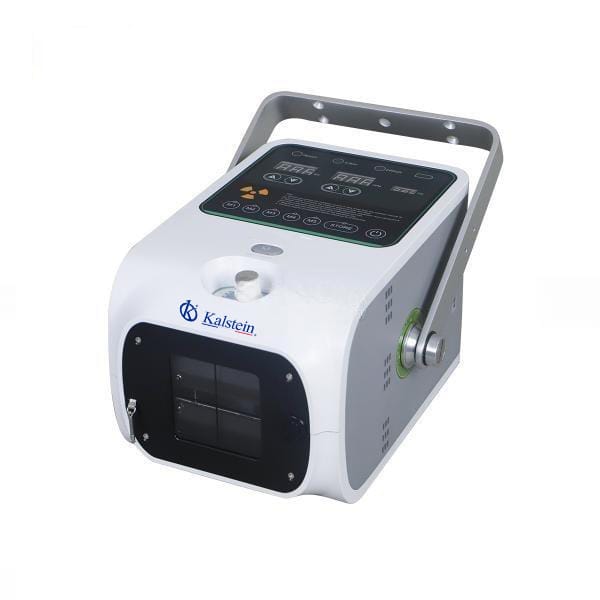
Environmental Conditions and Installation Requirements for the YR06161 Portable Digital X-ray
The YR06161 is a state-of-the-art Portable Digital X-ray system designed specifically for veterinary applications. Understanding the environmental conditions and installation requirements is essential for optimal performance and longevity of this equipment. This article delves into crucial factors to consider when setting up and using the YR06161 in different environments.
Technical Specifications of the YR06161
| Specification | Detail |
|---|---|
| Model | YR06161 |
| Power Supply | AC 220V/110V ±10% 50/60 Hz |
| Power (kW) | 1.6 |
| kV | 50 ~ 90 |
| mAs | 20 |
| mA | 20 |
| SID Measurement | Ultrasonic |
| Light Source On Time (sec) | 30 |
| Communication | RS232/Bluetooth |
| Exposure | Hand Switch/315M |
| Weight (kg) | 7 |
| Focal Spot Sizes Tube (mm) | 1.2 |
| Target Angle Tube | 16° |
Essential Environmental Conditions for the YR06161
To ensure the YR06161 operates efficiently, certain environmental conditions must be maintained. These conditions directly influence the functionality and accuracy of the digital X-ray imaging system.
Temperature and Humidity
The ideal operating temperature range for the YR06161 is between 10°C to 35°C. Operating outside this range can lead to inaccurate readings or device failure. Humidity levels should remain between 30% and 75% to prevent moisture-related damage to the electronic components.
Voltage and Frequency
The device is designed to operate on a power supply of AC 220V/110V ±10% at a frequency of 50/60 Hz. It is crucial to ensure that the power source is stable to prevent fluctuations that can affect performance.
Ventilation and Air Quality
Good ventilation is necessary to maintain optimal operating conditions and prolong the lifespan of the equipment. Poor air quality can lead to overheating and damage to electronic components.
Vibration and Electromagnetic Interference (EMI)
Your setup location should be free from excessive vibration and EMI, which can disrupt the function of sensitive electronic equipment. Ideally, the YR06161 should be placed on stable surfaces away from high-EMI environments, such as motors or transformers.
Installation Requirements for the YR06161
Proper installation is vital for the YR06161 to perform at its best. Here are the key installation considerations to keep in mind:
Unboxing and Initial Setup
When unboxing the YR06161, ensure all components listed in the user manual are present. Check for any physical damage before proceeding with the installation.
Leveling and Positioning
The equipment must be installed on a level surface to ensure accurate readings. Use a spirit level during the setup process. Remember to position the X-ray machine at a safe distance from areas with heavy human traffic.
First-Run Calibration
After installation, perform the first-run calibration as per the manufacturer’s guidelines. This step is crucial for ensuring that the readings are precise and meet the required standards.
Network and Bluetooth Setup
The YR06161 allows for Bluetooth connectivity with tablets for real-time parameter adjustments. Make sure to configure this feature correctly during the installation to enhance operational efficiency.
Common Installation Mistakes
While setting up the YR06161, certain common mistakes can occur, affecting its performance:
- Ignoring the environmental conditions leading to equipment failure.
- Improper leveling of the device, causing inaccurate imaging.
- Failure to perform initial calibration, resulting in erroneous readings.
- Neglecting to secure the Bluetooth connection, which hinders usability.
Frequently Asked Questions
What are the optimal environmental conditions for the YR06161?
Optimal conditions include a temperature range of 10°C to 35°C and humidity levels between 30% and 75%. These conditions ensure the proper functioning of the device.
How can I ensure proper installation of the YR06161?
Proper installation involves unboxing the unit carefully, leveling the device, and following the calibration steps outlined in the user manual to ensure accurate readings.
What should I do if I encounter power fluctuations while using the YR06161?
Consistent power supply is crucial. Consider using a voltage stabilizer to prevent fluctuations that could affect device performance.
How often should the YR06161 be calibrated?
Calibration should be performed after the initial setup and regularly as recommended by the manufacturer, especially if the device is moved to a different location.
Can the YR06161 be used in outdoor settings?
Yes, the YR06161 is designed for outdoor use; however, ensure that the environmental conditions are met, and the device is protected from direct exposure to harsh weather.
What are the common symptoms of malfunctioning YR06161?
Common symptoms include error codes, inaccurate imaging results, or failure to power on. Each symptom should be diagnosed systematically to identify the underlying issue.
Where can I request a quote for purchasing the YR06161?
You can request a quote for the YR06161 by reaching out through the appropriate channels to obtain pricing and availability information.
If you are looking for a fusion of innovation and quality, you have come to the right place. At Kalstein, we offer you the luxury of exploring our exclusive catalog of laboratory equipment. We manufacture every device to the highest standards of excellence. Our intuitive and seamless online purchasing channels are designed for your convenience, securing the most competitive prices. Hesitate no longer — we bring science to life, it is time to become part of our community.