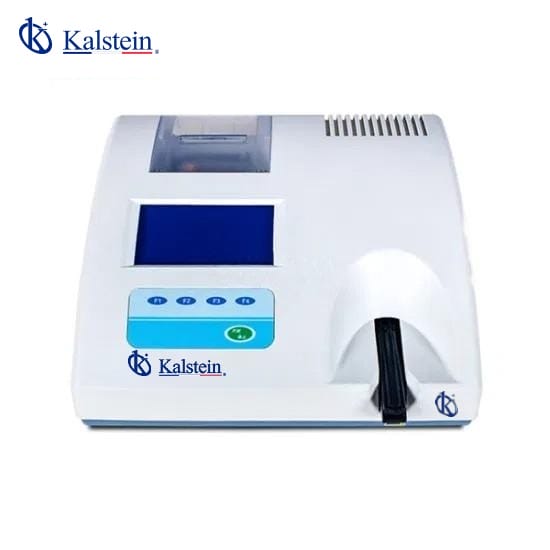
Common Errors and Troubleshooting for the YR06175 Urine Analyzer
The YR06175 Urine Analyzer is an essential tool for veterinary diagnostics, yet like any precision instrument, it can experience issues. This guide focuses on common errors associated with the YR06175, offering a systematic troubleshooting approach to help operators effectively resolve problems.
Technical Specifications of YR06175
| Specification | Details |
|---|---|
| Model | YR06175 |
| Category | Veterinary Analyzer |
| Gross Weight (kg) | 1 |
| Test Items | Leukocytes, Bilirubin, Occult Blood, Urobilinogen, Ketones, Glucose, Proteins, pH, Nitrites, SG, VC |
| Processing Capacity | Standard Mode: 60 samples/hour |
| Fast Mode | 120 samples/hour |
| Display | 5" Large LCD Screen |
| Memory | 4000 sample results |
| Output | Built-in Thermal Printer |
| Strips | 11G Urine Reagent Strips |
| Power Supply | AC 110-220V, 50/60Hz |
| Net Weight | 3.5kg |
| Dimensions | 320mm x 300mm x 120mm (L x W x H) |
Common Symptoms and Troubleshooting Steps
Understanding the common symptoms that may arise during the operation of the YR06175 Urine Analyzer is vital for timely and effective troubleshooting. Below is a list of frequent issues along with their probable causes and solutions.
Equipment Does Not Power On
This symptom may occur due to various reasons, including power supply issues or internal faults.
- Probable Cause: Power cable not connected properly.
- Probable Cause: Power outlet is not functioning.
- Probable Cause: Internal fuse blown or damaged.
Diagnostic Steps: 1. Check the power connection and ensure it is securely plugged in. 2. Test the outlet with another device to confirm functionality. 3. If necessary, open the device and inspect the internal fuse.
Solution: Replace the faulty power cable or fuse as needed.
Error Code E-03 Displayed
Error code E-03 typically indicates an issue with the sample processing.
- Probable Cause: Sample not prepared correctly.
- Probable Cause: The internal system needs calibration.
Diagnostic Steps: 1. Verify that the sample is prepared according to the guidelines. 2. Perform a system calibration using the calibration solution.
Solution: Correct the sample preparation method and recalibrate the device.
Inconsistent Readings
Inconsistent readings can lead to unreliable results, which is critical in veterinary applications.
- Probable Cause: Expired or improperly stored reagent strips.
- Probable Cause: Environmental factors affecting results (e.g., temperature or humidity).
Diagnostic Steps: 1. Check the expiration dates on reagent strips and store them as recommended. 2. Ensure the operation environment meets the specified requirements.
Solution: Replace expired strips and adjust environmental conditions as necessary.
Symptom-Cause-Solution Table
| Symptom | Probable Cause | Solution |
|---|---|---|
| Equipment Does Not Power On | Power cable not connected, defective outlet, blown fuse | Check connections, test outlet, replace fuse |
| Error Code E-03 | Improper sample preparation, calibration needed | Correct preparation, recalibrate system |
| Inconsistent Readings | Expired strips, environmental issues | Replace strips, adjust environmental conditions |
Frequently Asked Questions
What should I do if the YR06175 gives me an error code that I do not understand?
First, refer to the user manual for a list of error codes and their meanings. If the code is not listed or is persistent, consider reaching out to technical support for assistance.
How can I ensure the accuracy of results from the YR06175?
To ensure accurate results, regularly calibrate the device, use reagents that are within their expiration dates, and follow the sample preparation guidelines precisely.
What are the best practices for maintaining the YR06175 Urine Analyzer?
Regularly clean the device, store it in a suitable environment, and perform routine checks on the calibration and function of the components to ensure reliable operation.
How often should I replace the reagents used with the YR06175?
Reagents should be replaced according to the manufacturer's recommendations or when they reach their expiration date. Additionally, if results appear inconsistent, consider replacing them sooner.
Can I connect the YR06175 to a computer for data management?
Yes, the YR06175 features easy connectivity options to a PC for data transfer and management, allowing for better record-keeping and analysis.
What are the typical troubleshooting steps if the printer does not work?
If the thermal printer is not functioning, check for paper jams, ensure the printer is set up correctly in the settings, and check if the thermal paper is loaded properly.
How should I dispose of expired reagents from the YR06175?
Expired reagents must be disposed of according to local regulations for hazardous waste. Ensure to follow safety guidelines while handling and disposing of such materials.
If you are looking for a fusion of innovation and quality, you have come to the right place. At Kalstein, we offer you the luxury of exploring our exclusive catalog of laboratory equipment. We manufacture every device to the highest standards of excellence. Our intuitive and seamless online purchasing channels are designed for your convenience, securing the most competitive prices. Hesitate no longer — we bring science to life, it is time to become part of our community.