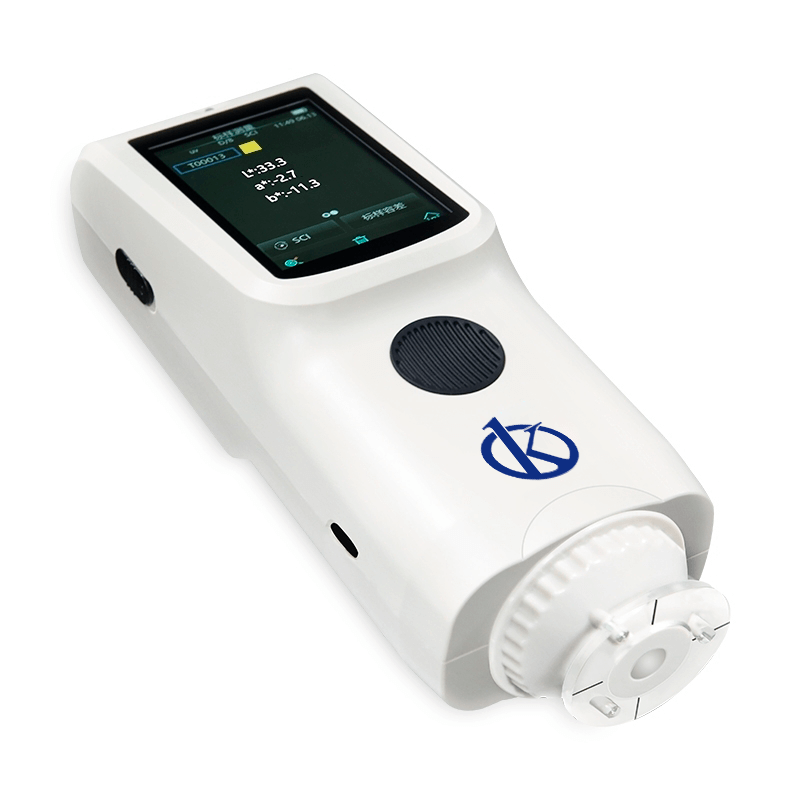
Installation and Startup Guide for the YR05519 Spectrocolorimeter
The YR05519 Spectrocolorimeter from Kalstein represents a cutting-edge approach to color measurement, utilizing advanced technology and design principles to ensure precision in various applications. This installation and startup guide provides step-by-step instructions to set up the YR05519 effectively, allowing users to maximize its capabilities from the outset.
Unboxing Checklist
Before proceeding with the installation of the YR05519, ensure that all components are present and undamaged. Below is a checklist of items to verify:
- YR05519 Spectrocolorimeter unit
- Power adapter
- USB cable
- User manual
- Calibration cavity (white and black)
- Protective cover
- Carrying strap
- 8 mm flat measurement aperture
Setting Up the YR05519
Follow these instructions to set up the YR05519 spectrocolorimeter before the initial use:
1. Positioning the Device
Choose a stable and flat surface for the YR05519. Ensure that the area is free of direct sunlight and other sources of interference such as strong artificial lights. This positioning helps maintain the accuracy of the measurements.
2. Power Connection
Connect the power adapter to the YR05519 and plug it into an appropriate power outlet. Verify that the voltage and frequency match the specifications outlined in the user manual.
3. First Power-Up Sequence
Press the power button to turn on the device. The screen will display a self-test message. Once the self-test is complete, the unit will be ready for calibration.
Calibration Procedures
Calibration is essential for accurate measurements. Follow these steps to perform the calibration on the YR05519:
1. White Calibration
Use the white calibration cavity provided. Place the calibration cavity on the measurement surface, and select the calibration option on the screen. Follow the prompts to complete the white calibration.
2. Black Calibration
Remove the white calibration cavity and replace it with the black one. Again, select the calibration option and follow the prompts to complete the black calibration.
Preparing for Measurements
With the device calibrated, the YR05519 is now ready for its first measurement. Here are steps to ensure correct usage:
1. Sample Preparation
Ensure the sample is appropriately prepared. The measurement aperture of 8 mm is suitable for most standard applications. Ensure the sample is flat and free from dust or residues.
2. Performing a Measurement
Align the measurement aperture with the sample and press the measurement button on the interface. The device will provide a reading within approximately 1.5 seconds, showing values for L, A, and B. Pay attention to the readings to ensure they fall within acceptable ranges.
Common Setup Mistakes to Avoid
To ensure a smooth installation and startup experience, avoid the following common mistakes:
- Neglecting to calibrate the device before use, which can lead to inaccurate measurements.
- Using the device in environments that do not conform to the specified operating conditions.
- Failing to properly secure the device on a stable surface, leading to movement during measurements.
Technical Specifications of YR05519
| Specification | Description |
|---|---|
| Model | YR05519 |
| Optical Geometry | D/8 (diffuse illumination, 8-degree viewing angle) |
| Measuring Aperture | Φ8mm |
| Light Source | Combined full-spectrum LED light source |
| Measurement Time | Approximately 1.5 seconds |
| Battery Life | 6000 measurements in 8 hours |
| Display | 3.5-inch color TFT LCD, capacitive touch screen |
| Operating Environment | 0~40℃, 0~85%RH (non-condensing) |
Frequently Asked Questions
What should I do if the YR05519 does not power on?
If the YR05519 does not power on, first check the power connection and ensure the outlet is functional. Verify that the power adapter is correctly connected to the device. If the problem persists, consider resetting the device or contacting support.
How can I ensure accurate measurements with the YR05519?
For accurate measurements, it is crucial to calibrate the device before each use, ensure proper sample preparation, and operate the spectrocolorimeter within the specified environmental conditions.
What is the maximum sample thickness the YR05519 can handle?
The YR05519 is designed for flat samples; however, the maximum sample thickness should not exceed 10 mm to ensure optimal measurement accuracy.
How long does the calibration process take?
The calibration process for the YR05519 typically takes less than 5 minutes, including both white and black calibration steps.
Can I use the YR05519 for different types of samples?
Yes, the YR05519 is versatile and can be used for various applications, including plastics, paints, textiles, and ceramics, provided samples are adequately prepared and positioned.
What kind of maintenance does the YR05519 require?
The YR05519 requires regular cleaning of the measurement aperture and calibration cavities. It is also essential to check for software updates and ensure the device is stored in a controlled environment when not in use.
Where can I request a quote for the YR05519?
You can request a quote for the YR05519 on Kalstein Plus, where you'll find competitive pricing and options based on your needs.
If you are looking for a fusion of innovation and quality, you have come to the right place. At Kalstein, we offer you the luxury of exploring our exclusive catalog of laboratory equipment. We manufacture every device to the highest standards of excellence. Our intuitive and seamless online purchasing channels are designed for your convenience, securing the most competitive prices. Hesitate no longer — we bring science to life, it is time to become part of our community.